Web App Development UK A Strategic Guide
You're probably here because the brief has outgrown the website. A marketing site can explain what you do. It can capture leads. It can support a campaign. But once you need logins, workflows, user-specific dashboards, live data, approvals, bookings, asset libraries, configurators, learning tools, or interactive 3D content, you're no longer talking about a brochure site. You're talking about a web app. That distinction matters. In web app development UK projects, the biggest mistakes usually happen before any code is written. Teams ask for “a new website” when what they really need is an operational product. Or they assume an app must mean Apple App Store and Google Play, when a browser-based product would be faster to launch, easier to update, and better suited to the actual user journey. A modern web app sits in that useful middle ground. It runs in the browser, but behaves much more like software. It can remember the user, process data, integrate with internal systems, handle payments, support offline use in some cases, and deliver rich interfaces that feel close to native. In more advanced builds, it can also host real-time 3D scenes, product demos, training simulations, and XR-adjacent experiences through the browser. That's where the category has moved. The old picture of a web app as a form-heavy admin tool is incomplete. Today, a web app might be a customer portal, a planning platform, a content engine, a learning environment, or an immersive front end for Unity or Unreal output.
Introduction From Idea to Interactive Experience
Most buyers start with a practical question, not a technical one. They need to solve a business problem. Perhaps customers need self-service access. Perhaps staff are wasting time across spreadsheets and email chains. Perhaps a sales team needs a more convincing way to present a complex product. The answer might be a web app, but only if the product is designed around the job it needs to do. A web app is not just a website with more pages. It's a browser-based application built for interaction, logic, and repeat use. The user doesn't just read content. They sign in, complete tasks, save progress, trigger actions, view personalised information, and often return regularly because the product becomes part of their workflow.
Where web apps fit best
Web apps are strongest when the experience needs flexibility and reach. They work well for:
- •Client and staff portals where different users need different permissions, dashboards, and actions
- •Booking, ordering, and workflow systems that connect front-end actions to back-office logic
- •Learning and training platforms where progress, assessments, and media sit inside one controlled environment
- •Product visualisers and interactive demos that go beyond static pages and help buyers understand what they're purchasing
- •Campaign microsystems where brands need something more useful than a landing page, such as a tool, quiz, configurator, or immersive story layer
A good way to think about it is this. A website tells. A web app does.
Practical rule: If your users need to complete a task, not just consume information, you're usually in web app territory.
That's especially relevant when the experience includes advanced visual content. Real-time animation, 3D previews, and browser-based XR features are no longer side projects for innovation teams alone. They're becoming part of mainstream product design for sectors that need clearer communication, stronger engagement, or more persuasive demonstrations.
Why UK Businesses are Investing in Web Apps
The business case is no longer theoretical. The UK app economy is large, active, and still growing. The UK mobile app development market, closely tied to web app development, generated around USD 13,930.12 million in 2024 and is forecast to grow at a 14.85% CAGR from 2025 to 2030, driven by business reliance on apps across major sectors such as banking, retail, healthcare, and entertainment, according to UK mobile app development market analysis. That matters because the line between mobile app strategy and web app strategy is thinner than many buyers assume. Many UK businesses now want one digital product approach that serves mobile users, desktop users, internal teams, and external customers without splitting budget across multiple parallel builds.
The commercial logic is straightforward
A well-planned web app can help a business:
- •Reduce friction by putting key actions in one place instead of spreading them across email, PDFs, forms, and disconnected tools
- •Create operational consistency so staff follow a structured workflow rather than inventing their own workarounds
- •Open new service models such as subscriptions, client portals, member areas, booking systems, and digital delivery layers
- •Support distributed teams where users need secure access from different devices and locations
- •Improve sales conversations by replacing static decks with tools that buyers can interact with directly
In practice, that means a manufacturer might use a web app for product configuration. A training provider might use one for course delivery and learner tracking. A cultural or entertainment brand might use one to extend IP into interactive experiences without asking every user to download a native app first.
Why browser delivery keeps winning
For many organisations, browser delivery is attractive because it lowers adoption friction. Users can click and start. Product teams can iterate faster. Marketing and sales teams can point people to a URL rather than asking them to install software first. Progressive Web Apps have accelerated that shift. They offer app-like behaviour inside the browser, including installability, offline support in some cases, and push functionality, which is why many teams exploring product strategy also learn custom web app development from Nerdify to understand where a bespoke browser-based build makes more sense than a standard site or native app.
The strongest business cases usually come from process improvement plus user convenience, not from novelty.
That's worth keeping in mind if your project includes immersive elements. 3D and XR features are valuable when they remove ambiguity, shorten decision cycles, or improve comprehension. They're expensive decoration when they don't serve a task.
Navigating UK Legal and Hosting Requirements
Plenty of web app projects get into trouble because compliance is treated as a post-launch tidy-up. That approach usually leads to rework. In the UK, legal and hosting decisions need to sit inside the discovery process, not outside it. The first issue is personal data. If your app collects names, email addresses, usage history, uploaded files, payment details, location data, or any information tied to an identifiable person, your team needs a clear position on what is collected, why it is collected, how long it is kept, and who can access it. That's not just a legal formality. It shapes user flows, database design, consent logic, account controls, and support processes.
GDPR in product terms
For clients, GDPR usually becomes manageable once it's translated into product decisions:
- •Data minimisation means only collecting information the product needs
- •Purpose clarity means each field, upload, or tracking event has a reason to exist
- •Retention planning means deciding what should be deleted, archived, or anonymised
- •User rights handling means the team can respond when someone requests access, correction, or deletion
- •Supplier review means checking the tools connected to the app, such as analytics, CRM platforms, payment systems, or cloud services
If a development partner talks about GDPR only in terms of privacy policies, that's too narrow. The product itself must reflect those rules.
Accessibility is not optional
In the UK, accessibility is a legal priority, with WCAG compliance mandatory for many services. That's especially important because over 70% of UK users are expected to access websites primarily via mobile devices by 2025, according to UK web development trends and accessibility guidance. The legal angle matters. The usability angle matters just as much. A web app with weak colour contrast, poor keyboard navigation, unlabeled controls, inaccessible media, or broken screen-reader behaviour shuts people out. It also creates avoidable support burden and undermines the product for everyone, not only users with permanent disabilities. A practical accessibility checklist should cover:
- •Semantic structure so assistive technologies can interpret the interface properly
- •Keyboard access for all main actions and navigation routes
- •Form clarity with labels, validation help, and sensible error states
- •Media alternatives such as captions, transcripts, and text support where needed
- •Responsive usability so mobile interactions remain readable and tappable
Accessibility done early improves UX. Accessibility done late becomes expensive remediation.
Hosting and data location decisions
Hosting is usually discussed as a technical line item, but it affects governance, resilience, and procurement. UK businesses often ask whether hosting should be UK-based, EU-based, or on a global cloud setup. The correct answer depends on the type of data, the contractual environment, expected user geography, and internal risk appetite. A practical hosting discussion should cover:
| Consideration | Why it matters |
|---|---|
| Data residency | Important when contracts, governance teams, or sector rules require tighter control |
| Performance | Hosting closer to key users can improve response times |
| Scalability | Cloud environments are easier to expand as usage grows |
| Support model | Someone needs clear responsibility for updates, uptime, backups, and incident response |
| Vendor fit | AWS, Azure, and Google Cloud all work well, but the right choice depends on integrations and team experience |
For most buyers, the sensible route is not “pick the cheapest host”. It's “pick an architecture and operating model that the business can govern confidently”.
The Modern Tech Stack for UK Web Apps
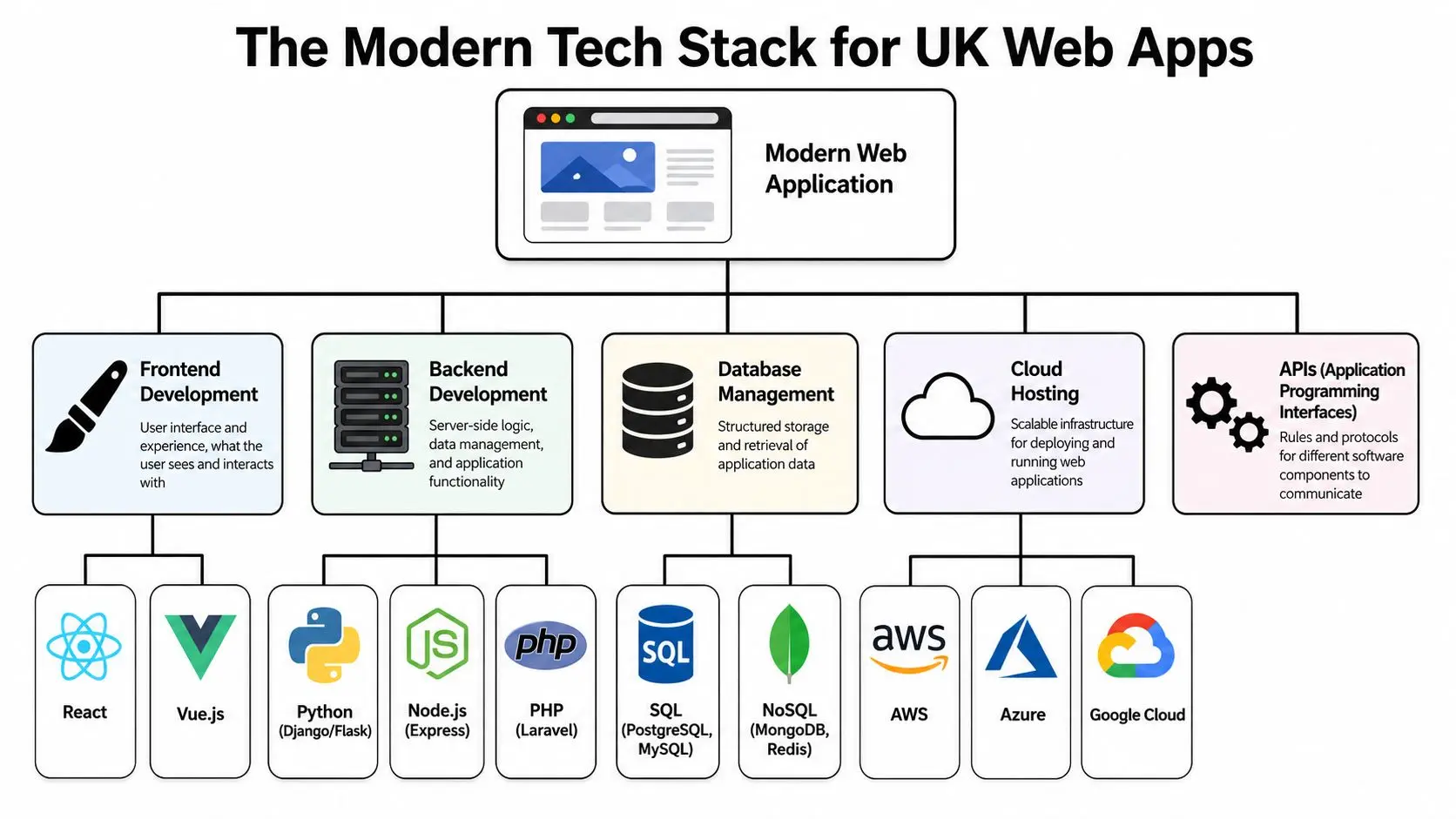
Most non-technical buyers don't need to memorise framework names. They do need to understand the shape of the system they're paying for. The simplest way to picture a modern stack is a restaurant. The frontend is the dining room. It's what the customer sees and interacts with. The backend is the kitchen. It handles orders, rules, stock, timing, and coordination. The database is the storeroom. APIs are the passes between teams. Cloud hosting is the building and utilities that keep everything running. That separation matters because modern web app development uk projects are usually built as connected layers rather than one giant codebase.
What the main layers actually do
On the frontend, UK teams commonly use React, Vue, or Angular to build interfaces that feel responsive and dynamic. These tools are well suited to dashboards, portals, booking flows, admin systems, and any interface where the screen updates frequently without a full page reload. On the backend, teams often use Node.js, Python with frameworks such as Django or FastAPI, PHP with Laravel, or Ruby on Rails. The backend handles the logic that users don't see directly. Authentication. permissions. business rules. file handling. integrations. payment events. notifications. The database sits behind that logic. Depending on the product, it might store customer records, product data, content assets, analytics events, assessment progress, or metadata for 3D and media libraries.
Why this architecture works
This stack gives teams room to scale and maintain the product properly. Designers can improve the interface without rewriting the whole platform. Backend developers can extend core logic without destabilising the visual layer. Infrastructure teams can improve deployment and resilience without redesigning the app. For a clear primer on the moving parts, buyers often benefit from understanding your technology stack before supplier conversations become too abstract. A practical modern combination in the UK market is React on the frontend, Node.js APIs on the backend, and deployment on AWS, Azure, or Google Cloud. According to this UK web application development guide, pairing React with Node.js APIs on cloud platforms like AWS can reduce latency by 40-60% for interactive 3D experiences compared with older monolithic stacks. That kind of performance difference becomes important when the app is doing more than rendering text and forms.
Where real-time 3D and XR fit in
Many generic articles stop at this point, but modern web apps increasingly include richer visual layers. A browser-based product can embed outputs from Unity or Unreal using technologies such as WebGL and, in some cases, WebAssembly-supported workflows. That allows a web app to host:
- •Interactive product visualisers
- •Virtual environments for training or onboarding
- •Explorable architectural or spatial previews
- •Animated explainers with user-controlled viewpoints
- •XR-adjacent experiences that run in-browser before a full headset deployment
That doesn't mean every project should use a game engine. Often it shouldn't. But when the user needs to inspect, compare, rehearse, configure, or understand something spatial or technical, real-time 3D can be a practical interface choice, not a gimmick.
A good stack is not the newest stack. It's the one that supports the product, the content, and the team that has to live with it.
Common stack mistakes
The failures are predictable:
- •Choosing tools for fashion value instead of team fit and product requirements
- •Overbuilding the first release with enterprise complexity before the workflow is proven
- •Bolting on 3D late instead of designing performance budgets and asset strategy from the start
- •Ignoring content operations so the app launches but no one can manage updates cleanly
- •Treating hosting separately from development when deployment, monitoring, and support should be planned together
If a project needs rich visual content, the technical stack and the production pipeline have to be designed as one system. Otherwise the app team and the content team spend the project fighting each other.
Your Project Lifecycle From Brief to Launch
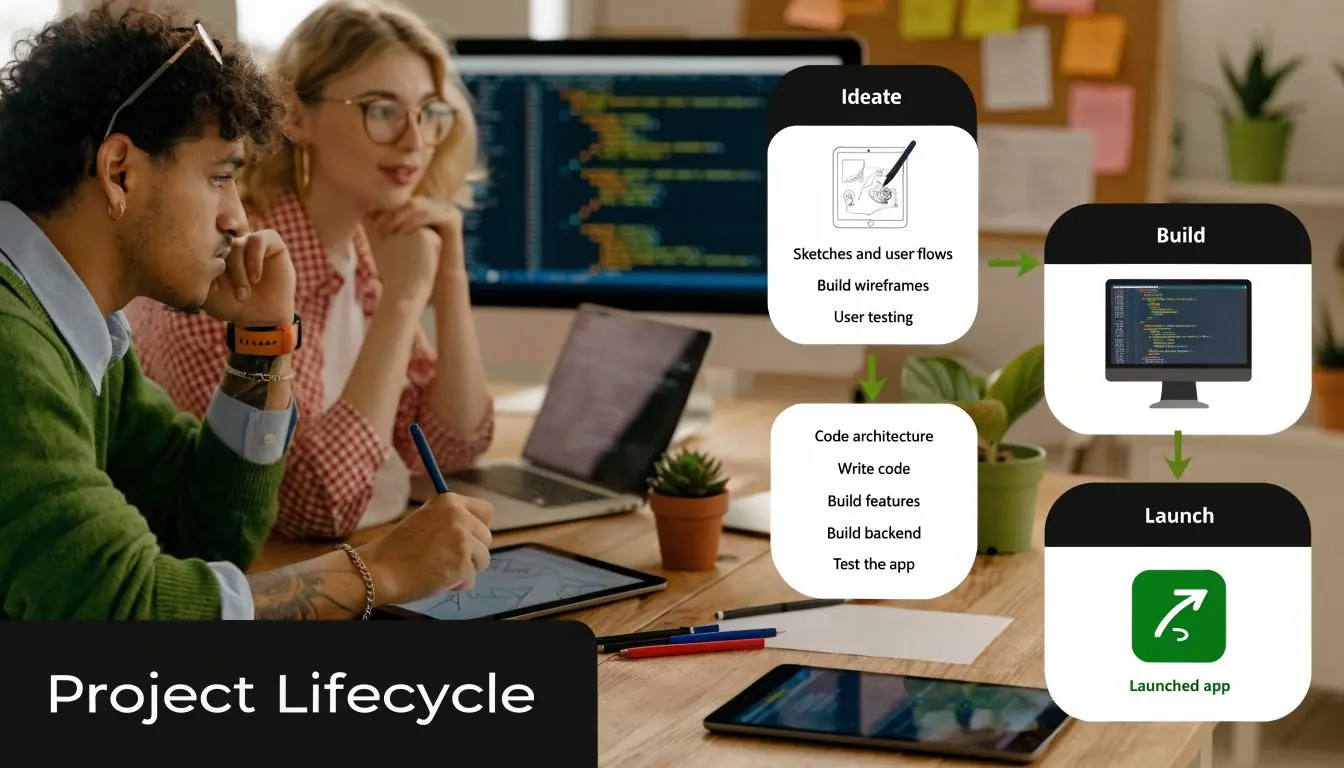
Good web apps don't emerge from a single requirements document. They are shaped through decisions, prototypes, trade-offs, and testing. The healthiest projects are collaborative, but they're also structured. Everyone needs to know what happens when, who owns which decisions, and what “done” means at each stage.
Discovery and strategy
This phase decides whether the project will solve the right problem. It usually covers user groups, business goals, feature priorities, technical constraints, integrations, content needs, and success criteria. Clients often want to rush this part. That's usually a mistake. If discovery is skipped, the team tends to build a product shaped by assumptions, internal politics, and edge-case requests rather than actual user needs. Strong outputs at this point include:
- •A prioritised feature set split into must-haves and later phases
- •User journeys showing how different audiences move through the product
- •Technical recommendations based on complexity, hosting, and integration needs
- •A delivery roadmap that links scope to cost and timeline
- •A risk register covering compliance, data, dependencies, and operational gaps
If you want a broader planning reference before kickoff, this complete guide to app development in the UK from concept to launch is a useful companion read.
UX and interface design
At this stage, the app becomes tangible. Teams map the information architecture, wireframe the screens, define interaction patterns, and build the visual language. For complex products, clickable prototypes are often more useful than long written specifications because they expose confusion early. The client's role matters here. Fast, clear feedback is valuable. Endless opinion rounds from stakeholders who weren't part of discovery are not.
If users need training just to understand the interface, the design work isn't finished.
Development and integration
Build usually starts in parallel streams. Frontend developers create the interface. Backend developers build logic and data structures. DevOps or infrastructure specialists prepare environments and deployment workflows. Content or 3D teams prepare assets in the formats the app can use. For advanced experiences, this is also where performance discipline matters. Interactive animation, WebGL builds, media compression, asset loading, and mobile constraints need active management. Otherwise the product looks impressive in review meetings and struggles in real conditions.
QA, launch, and the first live month
Testing isn't just bug finding. It checks whether the product behaves correctly across devices, browsers, user roles, and edge cases. It also confirms that integrations, analytics, permissions, and content workflows operate as intended. A reliable launch plan usually includes:
- Pre-launch checks covering tracking, redirects, permissions, legal content, and rollback planning
- Controlled release so the team can observe real usage without unnecessary risk
- Early support coverage because the first live weeks reveal workflow issues that staging never shows
- A post-launch backlog for improvements based on observed behaviour, not just pre-launch assumptions
Understanding Web App Costs and Timelines in the UK
Buyers usually ask for a number too early, and suppliers sometimes give one too confidently. The actual answer depends on scope, complexity, integrations, governance requirements, content production needs, and whether the product is being built as an MVP or as a more mature platform from day one. Still, there are useful ranges. In the UK, custom web apps can average £50K-£150K and take 6-12 months, while simpler low-code solutions might range from £10K-£40K over 2-4 months. Projects with advanced features such as XR typically sit toward the higher end of the scale, according to UK web app pricing guidance.What really drives price
Cost usually rises because of one or more of these factors:- •Complex user roles and permissions
- •Third-party integrations such as CRMs, payment gateways, ERP systems, or booking platforms
- •Custom workflows that can't be handled by off-the-shelf plugins
- •High content demands including video, animation, product data, or 3D assets
- •Operational requirements such as audit trails, admin tooling, and reporting
- •Performance requirements when the app needs to behave well on mobile and under load
The other major variable is uncertainty. A tightly defined, limited-scope product is easier to estimate than a project where discovery is still uncovering the actual brief.
Fixed price or time and materials
There is no universal winner here. Fixed price can work well when scope is stable, acceptance criteria are clear, and the product is not heavily experimental. It gives procurement teams more certainty, but it can lead to painful change control if the brief evolves. Time and materials is often better for more bespoke products, especially where user testing, integrations, or immersive features will shape the build as it develops. It gives teams flexibility, but it needs stronger governance and a client who can make timely decisions.
UK Web App Development Cost and Timeline Estimates 2026
| App Type | Typical UK Cost Range | Estimated Timeline |
|---|---|---|
| Low-code or simple PWA | £10K-£40K | 2-4 months |
| Custom bespoke web app | £50K-£150K | 6-12 months |
| Bespoke web app with advanced 3D or XR features | Higher end of the custom range, depending on integration and content complexity | Typically longer planning and delivery cycles within or beyond the custom app window |
That final category needs careful interpretation. XR and real-time 3D don't just add development effort. They add asset production, optimisation, testing overhead, and sometimes new review cycles across creative and technical stakeholders. A useful budgeting mindset is to separate three things:
- •Core platform cost for the app itself
- •Content production cost for media, animation, 3D, and copy
- •Ongoing operating cost for hosting, support, maintenance, and future iterations
For a more detailed breakdown of how pricing tends to work in practice, this UK app pricing guide is worth reviewing before supplier outreach.
How to Choose the Right UK Development Partner
A polished proposal doesn't tell you much. What matters is whether the team can understand the business problem, shape the right product, and keep delivery under control when reality gets messy. That's why choosing a partner is less about finding coders and more about finding a group that can make sensible decisions across product, design, technology, and delivery. If your app includes advanced visual features, that bar gets higher because the team also needs to manage performance, media pipelines, and the practical constraints of browser delivery.

What a strong partner does differently
A capable team won't jump straight to solutioneering. They'll ask about users, process bottlenecks, internal ownership, data sensitivity, rollout expectations, and what success looks like after launch. They'll challenge weak assumptions instead of nodding through them. Their portfolio should also show evidence of range. Not just stylish screens, but proof they can handle different product types, integration levels, and delivery conditions. If a project needs browser-based 3D, immersive content, or advanced interactivity, the portfolio should show work where performance and user flow were clearly part of the design thinking.
Questions worth asking in the first serious meeting
Use the conversation to expose how the team thinks.
- •How do you handle discovery? If they minimise this phase, expect trouble later.
- •Who will work on the project? You need clarity on senior involvement, not just sales-stage expertise.
- •How do you manage scope change? Every bespoke product changes. The issue is how calmly that change is handled.
- •How do you test across devices and browsers? Browser variation still matters, especially for media-heavy products.
- •How do you plan for launch and support? A handover without an operating model isn't a complete delivery.
- •What's your experience with performance-heavy builds? This is critical if the app includes animation, 3D, or rich media.
One of the sharper technical differentiators to ask about is whether the team understands PWAs, SPAs, and WebAssembly for performance-intensive browser work. According to this overview of UK web development trends, top-tier UK developers use Progressive Web Apps and Single Page Applications for offline-capable experiences, while WebAssembly helps deliver near-native performance for demanding tasks like real-time 3D rendering.
Don't ask only what they can build. Ask what they would advise you not to build, and why.
That answer tells you whether they are protecting outcomes or chasing scope.
Red flags that usually show up early
| Red flag | What it often means |
|---|---|
| They quote immediately from a vague brief | They're pricing assumptions, not solving the problem |
| They can't explain trade-offs clearly | Delivery may become opaque once work starts |
| They talk only about features | Product strategy and user adoption may be weak |
| They have no clear post-launch model | Support, maintenance, and improvement may become your problem |
| They dismiss accessibility or compliance as minor details | They're likely underestimating risk |
For teams evaluating both design and development capability, these insights for product teams on design partners are useful because they focus on how collaboration quality affects outcomes, not just aesthetics. If you're creating a shortlist, this guide on how to find and choose the right mobile app development agency is also relevant because many of the same procurement principles apply to browser-based product work.
Frequently Asked Questions
Should we build a web app or a native app
Start with user behaviour and product requirements. Choose a web app when reach, speed of access, and cross-device compatibility matter most. It's often the right option for portals, tools, dashboards, booking journeys, training systems, and interactive sales experiences. Choose a native app when the product depends heavily on device-specific behaviour, store distribution, or persistent hardware-level features. That can include some consumer products, field tools, or specialist mobile workflows. For many businesses, a web app is the better first move because it proves the workflow before a native roadmap is funded.
Can a web app still feel like an app
Yes. A well-designed web app can feel fast, responsive, and product-like rather than page-based. That's especially true when the interface is built as a modern frontend, not as a traditional template-driven site. The key is not whether it lives in a browser. The key is whether it behaves with enough clarity and speed to support repeat use.
What costs continue after launch
The build budget is only one part of the picture. Most apps also need:
- •Hosting and infrastructure management
- •Security updates and dependency maintenance
- •Bug fixing and browser compatibility work
- •Feature iteration based on user feedback
- •Content and asset updates
- •Support coverage for admin users or customers
This isn't a sign of failure. It's normal product ownership.
How important is security in a web app project
It's fundamental. Security shouldn't be bolted on through a final checklist. It needs to be built into authentication, permissions, hosting, code quality, vendor choices, and operating processes. At minimum, teams should expect secure connections, careful handling of user data, role-based access controls, update routines, and regular review of vulnerabilities. If the app handles sensitive business or customer information, the operational discipline around access and monitoring matters just as much as the code.
Are immersive features worth it in a web app
Sometimes. They're worth it when they help users understand, compare, rehearse, or decide. Product configuration, training, technical explanation, and visual storytelling are all strong candidates. They're not worth it when they're added only to make the project sound cutting-edge. If the immersive layer doesn't improve the task, it usually increases cost and complexity without improving the result.
If you're planning a browser-based product and want a team that understands both dependable application delivery and advanced real-time content, Studio Liddell can help scope the right approach. That includes practical thinking around UX, architecture, animation, 3D, and XR, so the final product isn't just functional. It's persuasive, performant, and built for real-world use.