Hire the Best Application Developer for iOS
A lot of app projects stall before a single line of code is written. The brief sounds clear enough in the boardroom. You want an iPhone app that supports a product launch, extends a children’s brand, improves customer service, powers an event activation, or turns a training concept into something interactive. Then the practical questions arrive. Who should build it? What skills matter? How do you tell a polished pitch from a team that can ship? That is where many businesses start looking for an application developer for ios and quickly realise they are not really buying code. They are buying judgement, workflow, product thinking, delivery discipline, and the ability to turn a commercial idea into something people will use.
Your App Idea Needs an Expert Who Understands Your Vision
A business leader usually does not struggle with the idea. They struggle with translation. The product team may know the customer problem. Marketing may know the brand story. Operations may know what needs internal optimization. None of that automatically becomes a strong iOS app. The gap sits between intent and execution.
A good iOS developer closes that gap by asking the right early questions.
What strong early conversations sound like
They do not begin with frameworks. They begin with practical decisions:
- •Audience fit whether the app is for paying customers, staff, students, event visitors, or a licensed audience
- •Primary action what the user must be able to do quickly and repeatedly
- •Content model whether the app is driven by video, animation, account data, location, 3D assets, or live services
- •Commercial model whether revenue comes from direct sales, subscriptions, partnerships, or operational savings
- •Release scope what must be in version one, and what can wait
That sounds obvious. In practice, many projects still jump too quickly to screens and features. An iOS specialist earns their place by reducing ambiguity. They spot where a feature list is inflated. They know when native iOS interactions will help adoption and when a clever visual treatment will only slow users down. If the app involves animation, education, games, or XR elements, they also need to understand production realities beyond engineering.
A business does not need a developer who says yes to every feature. It needs one who protects the product from unnecessary complexity.
The strongest hires and agency partners behave less like order takers and more like product translators. They turn the vision into a buildable roadmap, identify the technical risks early, and keep the work aligned with launch goals rather than internal wish lists.
Defining the Modern iOS Application Developer Role
An application developer for ios is not just someone who can make an iPhone screen function. The modern role sits inside Apple’s ecosystem and carries responsibility for product quality, platform fit, performance, privacy, maintainability, and release discipline. If the app reaches iPhone first but may later expand to iPad or visionOS, that developer is already making architectural choices that affect future cost and speed.
Platform specialist, not general coder
A capable iOS developer understands Apple’s specific environment. That includes Xcode, Swift, SwiftUI, UIKit, Apple’s interface conventions, device capabilities, security expectations, and the approval process for the App Store. A web developer can be excellent at frontend work and still make poor decisions on iOS because touch behaviour, state management, permissions, offline handling, and hardware integration follow different rules. The difference becomes sharper in projects with richer media. For an app that includes 3D assets, motion, audio, camera use, or immersive interactions, iOS development is tightly connected to asset optimisation and runtime performance. A beautiful prototype means very little if it overheats a device, drains battery, or feels sluggish when users move between screens.
Product partner, not feature implementer
Businesses often think the role is mainly technical. In delivery, it is also strategic. A useful iOS developer can:
- •challenge whether a feature belongs in the first release
- •explain the trade-off between speed and technical debt
- •work with design on what feels native versus what feels forced
- •advise when backend dependence creates unnecessary launch risk
- •define what should be tested before stakeholders see a build
App projects rarely fail on syntax. They fail on bad scope control, weak handoffs, and unclear ownership.
Why AI now sits inside the role
The role has expanded again because clients increasingly expect intelligent features inside normal app experiences. A 2026 projection notes that over 80% of enterprises are expected to implement generative AI-enabled apps by year-end, increasing demand for iOS tools such as Xcode, SwiftUI, and Core ML in sectors including animation, XR, and gaming, according to this iOS development tools analysis. For a business buyer, the practical takeaway is simple. AI is no longer a separate innovation track. It is becoming part of everyday app planning.
What this looks like in real delivery
On a commercial project, the iOS developer often sits between several disciplines:
| Discipline | What the developer contributes |
|---|---|
| Design | native interaction logic, layout feasibility, animation performance |
| Production | sprint estimates, scope control, release planning |
| Backend | API contracts, caching, error states, authentication flows |
| QA | test coverage priorities, device checks, regression risk |
| Stakeholders | translating technical constraints into budget and timeline decisions |
The strongest developers make these conversations clearer, not more complicated.
The Essential iOS Developer Tech Stack for 2026
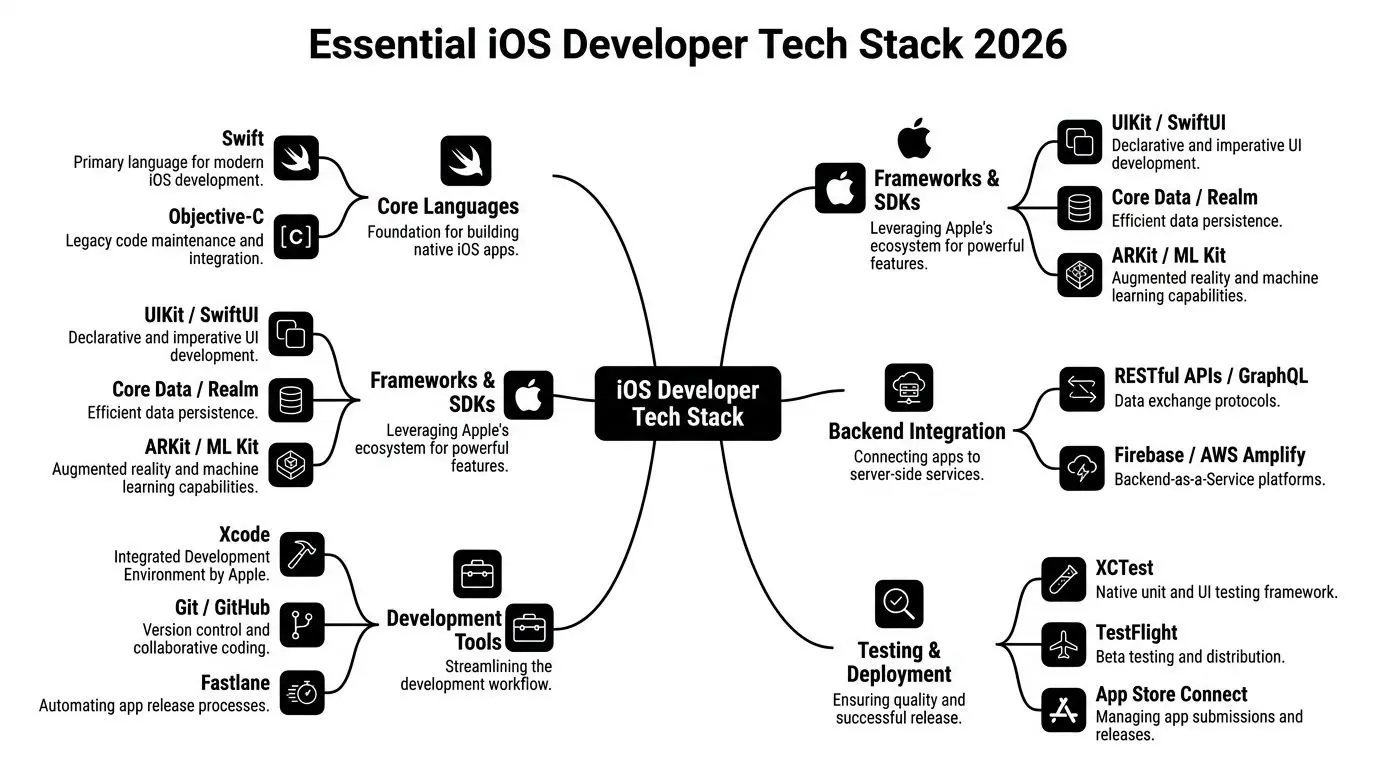
A serious iOS hire should be able to explain their stack in plain business terms. If they cannot tell you why one tool helps delivery, quality, or future flexibility, they probably know the words but not the workflow. The stack is not about collecting fashionable names. It is about shipping reliable apps on Apple platforms without avoidable rework.
Swift and Objective-C
Swift is the primary language for modern native iOS work. For a business, that usually means better long-term maintainability, clearer codebases, and easier hiring continuity. It is the default expectation for new projects. A candidate who works comfortably in Swift should also be able to discuss async work, data flow, app structure, and dependency choices in a practical way. Objective-C still matters in a narrower set of cases. If you are buying into an existing app, acquiring a product, or updating a long-running platform, older components may still exist. A developer does not need to prefer Objective-C, but they should know how to work around legacy code without destabilising the app.
SwiftUI and UIKit
This is one of the first real trade-offs worth discussing in interviews. SwiftUI is Apple’s modern UI framework. It is well suited to teams building across Apple devices and to products that need cleaner reuse between iPhone, iPad, and other Apple surfaces. It often supports faster interface iteration, which matters when product and design teams are still refining the experience. UIKit remains relevant. Large established codebases often use it heavily. Some interactions are still easier to manage in UIKit, especially where teams already have deep patterns and reusable components built around it. A strong iOS developer does not turn this into a religion. They choose the right mix for the app you are building.
If a candidate treats every project as a pure SwiftUI rebuild, be careful. Rewriting stable code can be more expensive than improving it.
Xcode and the day-to-day build environment
Xcode is the centre of native iOS delivery. That includes coding, debugging, device testing, simulator use, signing, profiling, and release preparation. A good developer does not just use Xcode. They know how to diagnose crashes, inspect performance issues, test against multiple device states, and keep builds manageable as the app grows. This matters more than many non-technical buyers realise. Poor build discipline slows every part of delivery, from designer review builds to bug fixing before launch.
Data and backend integration
Most apps do not live on the device alone. The iOS developer should be fluent in API integration, authentication flows, offline considerations, and local persistence. Depending on the app, they may use native storage approaches or integrate with backend services such as Firebase or AWS-backed systems. What matters commercially is not the brand of backend tool. It is whether the app remains usable when connectivity is weak, data changes mid-session, or a server response fails. Look for practical answers to questions like:
- •what should happen if the network drops during onboarding
- •how should account state persist between sessions
- •when should content cache locally
- •what breaks if the API contract changes
Those answers reveal delivery maturity.
Testing and release tooling
Testing and release tooling exposes weak teams. A production-ready iOS workflow usually includes:
- •XCTest for unit and interface testing
- •Git-based version control so multiple contributors can work safely
- •TestFlight for stakeholder review and beta distribution
- •App Store Connect for submission, metadata, release coordination, and compliance steps
- •CI and CD tooling to automate builds and reduce manual release mistakes
- •Fastlane or equivalent automation where teams need repeatable release processes
Testing is not glamorous, but it protects budget. When teams skip it, every update becomes more expensive because regressions show up late, often after design sign-off or client review. That is especially painful on apps with payment logic, account systems, media playback, or interactive learning flows where one bug can damage trust quickly.
Media, AR, and machine learning frameworks
This category matters if your app goes beyond standard forms and lists. An iOS developer working on richer products may need to handle:
- •Core ML for on-device intelligent features
- •ARKit for spatial or camera-led experiences
- •Animation and rendering integrations where visual assets come from a wider creative pipeline
- •Audio and video frameworks where content quality is central to the product
If your app includes 3D animation, branded character content, object visualisation, museum interpretation, or event-based immersive media, the developer must be able to speak with artists, technical artists, producers, and QA. That is a different level of delivery competence from shipping a straightforward utility app.
What a credible stack conversation sounds like
A weak answer sounds like a list of tools. A strong answer sounds more like this: we use Swift for maintainability, choose SwiftUI where it speeds cross-device UI work, retain UIKit where stable components already exist, automate builds to reduce release friction, test core user journeys before every stakeholder build, and structure media integration so creative changes do not break app performance. That is the difference between coding and shipping.
Choosing Your Development Team In-House, Freelance, or Agency
The right hiring model depends less on ideology and more on risk. Some businesses assume in-house is always safer. Others default to freelancers because they appear cheaper. Others go to an agency because they want one contract instead of many moving parts. Each route can work. Each can also fail for predictable reasons. A 2025 survey found that agency teams account for 23% of surveyed iOS developers, which makes them a meaningful option for businesses that need scalable specialist delivery. The same source notes the App Store generated $43.7 billion in the first half of 2022, compared with $21.3 billion for Google Play, which helps explain why many commercial app projects still prioritise Apple platforms first in revenue-focused categories, according to RentAMac’s iOS app development statistics.
Hiring model comparison
| Criterion | In-House Developer | Freelancer | Agency |
|---|---|---|---|
| Control | High day-to-day control | Moderate, depends on availability | Structured control through agreed process |
| Speed to start | Slower if recruitment is required | Often fast for a single specialist | Fast once scope and team are agreed |
| Scalability | Limited unless you hire more roles | Limited to one person or a small network | Easier to add design, QA, backend, production |
| Specialist coverage | Narrow if one hire is expected to do everything | Can be strong in one area | Better for mixed needs such as app, animation, XR |
| Delivery resilience | Depends on retention and management | Vulnerable to sickness, overbooking, or competing work | Better continuity across roles |
| Cost structure | Ongoing salary and management overhead | Flexible but can expand with scope creep | Higher entry cost, usually clearer delivery packaging |
| Best fit | Long-term product ownership | Small builds or targeted upgrades | Complex launches with multiple disciplines |
When in-house makes sense
Choose in-house if the app is a core product, not a campaign asset. This model works when you need sustained roadmap ownership, close alignment with internal systems, and daily product iteration. It is weaker when the project also needs animation, backend setup, QA, release management, and specialist interaction design that one hire cannot realistically cover.
When freelance works well
Freelancers are useful when the project is tightly defined. That might mean a feature extension, maintenance on an existing codebase, a rescue job with clear boundaries, or support for an internal team that already has product management and design in place. Problems usually begin when businesses try to turn one freelancer into developer, architect, QA lead, product owner, and release manager all at once.
When an agency is the practical answer
Agency delivery fits projects with moving parts. If the app includes a backend, custom design system, media pipeline, 3D assets, or app store launch support, an agency can reduce coordination overhead because the disciplines are already organised into a production structure. That is particularly useful for entertainment, educational, or immersive work where engineering and content production have to move together. For a broader UK-focused decision framework, this guide to hiring a mobile app developer in the UK is a useful reference point.
The biggest hidden cost in app delivery is not the day rate. It is the time spent coordinating gaps between people who were never set up to work as a team.
A Practical Hiring Checklist and Key Interview Questions
Most businesses do not need more theory at hiring stage. They need a filter. The UK hiring picture for iOS roles is often described too generically, without enough detail on local market realities, hiring patterns, and what businesses should test for. That gap makes practical hiring tools more valuable, as noted in this overview of iOS developer career guidance gaps.

The shortlist checklist
Before interviews start, get these points clear internally.
- •Define the app outcome whether the app sells, teaches, supports, demonstrates, or entertains:
- •List critical features such as offline use, account login, media handling, camera features, or app store deadline
- •Decide what is not version one because weak scope discipline creates weak hiring decisions
- •Map dependencies design assets, backend readiness, content approvals, legal review, and QA ownership
- •Assess team gaps whether you only need iOS engineering or also product, UX, QA, backend, and release support
Then look at the candidate or supplier through that lens, not through a generic developer template.
What to review in a portfolio
A polished visual portfolio is not enough. Look for evidence that the developer has worked on real shipping conditions:
- •apps with live content or accounts
- •updates to existing products, not only greenfield work
- •app store release involvement
- •collaboration with designers and non-technical stakeholders
- •handling of media-heavy or interactive experiences if your project needs them
Ask what was difficult in each project. Good candidates speak clearly about trade-offs, constraints, and fixes. Weak ones only describe the shiny parts.
Interview questions that reveal judgement
Use questions that force explanation.
- Tell me about an iOS project where the original scope changed. What did you cut, and why?
- How would you approach an app that needs to work acceptably with poor connectivity?
- What do you need from design before development can start properly?
- Describe a disagreement with a designer, producer, or stakeholder. How was it resolved?
- How do you decide whether to use SwiftUI, UIKit, or a mix?
- What should happen before an app build is shown to clients or senior stakeholders?
- How do you protect performance when an app uses animation, video, or 3D assets?
- What parts of App Store submission usually catch teams out?
Warning signs in interviews
A candidate may be technically capable and still wrong for commercial delivery. Watch for these issues:- •Tool-first answers they jump straight into frameworks without asking what the app needs to achieve
- •No trade-off language they never discuss compromise, only ideal solutions
- •Weak collaboration examples they frame all friction as someone else’s fault
- •No release ownership they have built features but never helped ship
- •Overconfidence on timelines they estimate quickly without clarifying dependencies
The best interview answers often begin with another question. That usually means the candidate knows delivery depends on context, not guesses.
Understanding Project Timelines and Cost Ranges
Businesses ask for a price early because they need budget confidence. That is reasonable. What is less useful is receiving one blunt number with no explanation of scope, dependencies, or support after launch. App work varies too much for that. A simple content-led app, a logged-in service product, and an interactive 3D experience are not the same job.
What changes time and cost
The biggest cost drivers are usually not visual polish alone. They are things like authentication, backend integration, account management, admin tooling, content pipelines, testing burden, app store compliance work, and how much uncertainty still sits inside the brief. Rich media and XR elements can also reshape the schedule because assets, engineering, optimisation, and QA have to be planned together.
A practical way to think about ranges
Rather than anchor on one quote, separate projects into delivery bands.
| Project type | Typical delivery shape | Main cost drivers |
|---|---|---|
| Simple utility or content app | Lean feature set, limited user states, straightforward release | design clarity, content prep, app store packaging |
| Data-driven app with backend | Accounts, APIs, dashboards, content syncing, more test cases | backend coordination, error handling, QA depth |
| App with 3D, animation, or XR elements | Media pipelines, optimisation, specialist interaction design | asset production, performance tuning, cross-discipline reviews |
That framing helps stakeholders compare proposals sensibly without pretending every app should cost the same.
Red flags in proposals
A weak proposal often reveals itself before work starts. Be cautious if a supplier:
- •quotes too quickly without a workshop or discovery pass
- •bundles everything into one line item so you cannot see where effort sits
- •ignores maintenance as if the app stops costing money after launch
- •promises exact dates before assets, backend, or approvals are confirmed
- •does not mention testing, analytics, or release management
If you want a grounded view of how scheduling usually unfolds, this article on understanding the app development timeline gives a useful production lens.
What a better proposal includes
A stronger quote usually includes phases. You should expect to see discovery, design, development, QA, stakeholder review, app store preparation, and post-launch support described separately. That gives you room to manage scope consciously instead of discovering late that every change request affects three other parts of the build.
Partnering with Studio Liddell for Integrated App Experiences
Some app projects are not standalone software jobs. They are content and product jobs at the same time. That is common when an app sits inside a broader brand, campaign, educational programme, exhibition, or entertainment property. In those cases, the delivery challenge is not only native iOS engineering. It is aligning interaction design, animation, visual storytelling, technical performance, and release planning into one pipeline. An app tied to a children’s IP may need character assets, motion, audio, safeguarding considerations, and repeatable content updates. An exhibition app may need spatial interaction, 3D visualisation, and dependable on-site behaviour. A training product may need assessment logic, accessible interaction, and media that teaches clearly under time pressure. There is also a known implementation gap around accessibility. Apple provides the APIs, but many teams still lack an accessibility-first workflow across design, production, development, and testing, as discussed in Apple’s WWDC accessibility guidance. For buyers, that means accessibility should be assessed as a delivery method, not left as a late compliance check. For businesses that need that broader production model, Studio Liddell’s app development work sits alongside animation, games, and XR delivery rather than outside it. That matters when the app is only one part of a larger audience experience and the team has to manage creative assets, interaction logic, and launch readiness together.
Frequently Asked Questions
Do I need a native iOS app, or would a web app do?
If the product depends on Apple device features, app store distribution, polished offline behaviour, stronger performance, or a more premium user experience, native iOS is usually the better fit. If the goal is simple access to information across many devices with minimal platform-specific behaviour, a web approach may be enough.
Should I hire one iOS developer or a team?
Hire one person only if the scope is tight and your internal team already covers design, product decisions, QA, and backend coordination. For most commercial launches, one person alone becomes a bottleneck.
How important is App Store experience?
Very important. Shipping is part of the job. A developer who has never handled app review, release packaging, metadata, testing builds, and approval issues may slow the project near launch.
What if my app includes animation or XR features?
Then you need more than app coding. You need a workflow that handles assets, optimisation, interaction design, testing, and device performance together.
If you are weighing options for an iPhone, iPad, or immersive app project, Studio Liddell can be a useful starting point for discussing how app delivery fits with animation, XR, and wider creative production needs.