Augmented Reality Video: The Producer's Guide
You can spend a lot of money on a glossy augmented reality video campaign and still end up with a weak result. The usual failure isn't the 3D layer, it's the plate underneath, the framing choices at shoot, the delivery format, or a network that can't hold the experience together in actual use. I've seen the same pattern in boardrooms, the demo looks sharp on Wi-Fi, then the same asset lands badly on a phone in a shop, at an exhibition stand, or on a rural connection. That's why the useful way to think about AR video isn't “How do we make it wow?”, it's “How do we build a production system that survives contact with UK mobile viewing habits?” In the UK, AR has moved beyond experiments into supported R&D and creative practice, with public investment through the Centre for Augmented Reality and a broader digital economy that government reported as supporting 2.1 million digital technology jobs and contributing £151 billion in gross value added in 2022 (UK digital economy context). Creative and cultural work has also helped normalise immersive formats, and the UK's creative industries were reported at £126 billion in gross value added and 2.4 million people employed in 2022 (UK creative industries context). The producer's mental model is simple. Plate first, layer second, distribution third. Get that wrong and no amount of polish saves the campaign. Get it right and AR video becomes a controllable format for marketing, education, retail, training, and location-based storytelling.
The Moment an AR Video Stops Feeling Magical
A marketing lead thinks the campaign is nailed. The hero visual is strong, the AR effect renders cleanly in the studio, and the client loves the preview on a fast connection. Then the asset goes live, the audience opens it on mixed devices and mixed networks, and the experience feels slow, awkward, or incomplete. That's the point where augmented reality video stops being a showcase and starts behaving like a production discipline.
What actually changed
The problem usually isn't that AR “didn't work”. The problem is that the team treated it like a single creative asset instead of a chain of dependencies. AR is real-time overlay, so the live camera view, the tracking method, the rendered layer, the codec, and the delivery path all need to work together. In the UK, that matters because mobile and broadband conditions aren't uniform, especially once campaigns leave major cities. Ofcom's broadband data shows that median fixed speeds are much stronger in urban areas than in many rural locations, so a delivery choice that looks fine in the office can still stall in the field. That's why practical guidance for AR video optimisation points to MP4 delivery at 5 to 10 Mbps, capped at 1080p and 30 fps (AR video optimisation guidance).
Practical rule: if the experience can't survive a weaker network, it isn't ready for a UK audience.
A useful way to frame this is through production architecture. AR video is not a magic layer you paste on at the end. It's a system that has to be shot, tracked, composited, encoded, and distributed with the final playback context already in mind. If you want examples of how that thinking shows up in real campaigns, the studio's overview of top augmented reality examples that are changing industries is a useful reference point.
What Augmented Reality Video Actually Is
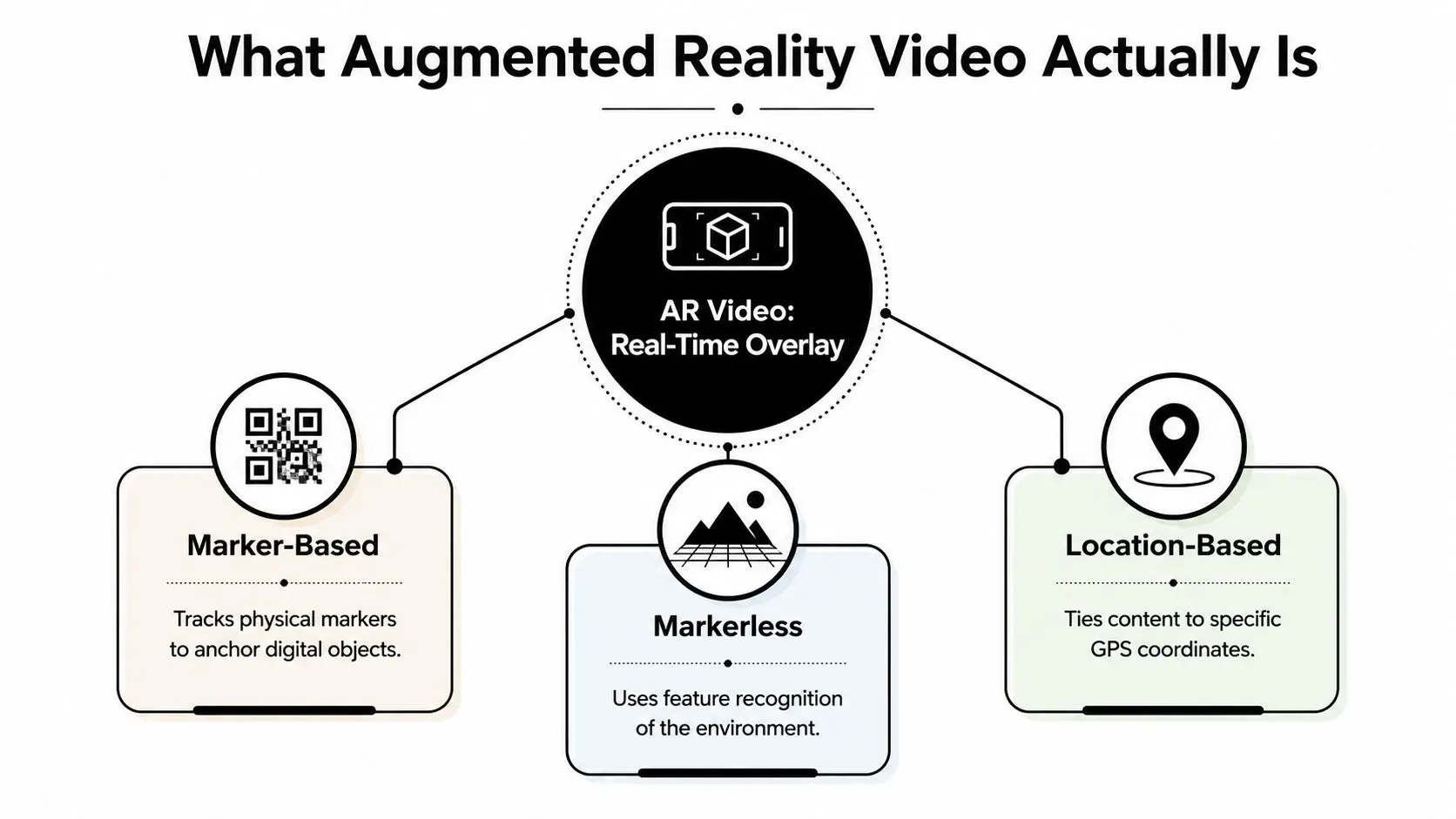
Augmented reality video is the real-time overlay of digital content onto a live camera view. IBM describes AR as using cameras, sensors, and displays to place digital content, including video, in correct perspective within the physical scene (IBM's AR definition). That last phrase matters, because the content is not just sitting on top of the image, it's rendered to match viewpoint and orientation.
Three production models
Imagine trying on clothes in a fitting-room mirror. In one setup, a label on the floor tells the mirror where to place the image. In another, the system reads the room and figures out where the garment should sit. In a third, the mirror is tied to a specific place, so the effect only appears in that location.
- •Marker-based AR anchors digital content to a printed marker, QR-style target, or other visual cue.
- •Markerless AR uses feature recognition in the environment, such as edges, planes, and surfaces.
- •Location-based AR ties content to GPS coordinates or another place-specific trigger.
That distinction matters because it changes the shoot, the tracking setup, and the user journey. Marker-based experiences are often easier to control, but they depend on the marker staying visible and readable. Markerless experiences feel more fluid, but they're more sensitive to surface quality, lighting, and scene complexity. Location-based AR is powerful for heritage, events, and retail, but it needs the right physical context to make sense. Here's the other comparison clients ask about. AR video is not VR. VR replaces the actual view with a full digital environment. AR keeps the actual world in frame and adds the digital layer on top. It's also different from 360 video, which captures a panoramic scene rather than placing responsive content into a live view. A useful display benchmark comes from visual acuity. A Nature article converts human 20/20 vision to about 1 arcminute angular resolution, or roughly 60 pixels per degree (Nature benchmark). That doesn't mean every AR asset needs to hit that number in every context, but it does give production teams a concrete way to think about sharpness for overlays and fine detail.
If you need a broader explainer on live-overlay formats and use cases, a guide to augmented reality experiences is a good companion piece.
Inside the Production Pipeline
A clean AR job often looks straightforward from the outside because the difficult decisions happen before anyone sees the finished layer. In practice, the pipeline starts with the brief, moves into previz, then into asset build in Maya or Blender, before the scene is assembled in Unity or Unreal for tracking, interaction, and runtime checks. Capture, compositing in Nuke or After Effects, and final delivery in the client's required formats come after that. The choice of engine matters here, because Unity is usually the more practical fit for faster iteration and broader deployment, while Unreal can make sense when the scene depends on heavier visual fidelity and the team can afford the setup time.
Where the time goes
The brief has to start with the viewing context. A social-first campaign, a retail demo, a heritage install, and an internal training asset all create different production constraints, especially once aspect ratios, device behavior, and interaction logic enter the picture. Previz then checks camera movement, screen placement, and how the digital layer will behave before final assets get built. That step saves more time than trying to correct structural problems in post. The workflow usually breaks down like this:
- Brief and creative direction, where the audience, device, and trigger are locked.
- Previz and layout, where camera language and placement are tested.
- Asset creation, often in Maya or Blender.
- Tracking and runtime setup, usually in Unity or Unreal.
- On-set capture and plate work, including clean plates and reference lighting.
- Compositing and cleanup, often in Nuke or After Effects.
- Final delivery and QA, across devices and target platforms.
Producer's note: AI saves time on repetition, not on bad decisions.Budgeting gets cleaner once the team stops treating “AR video” as a single line item. Asset creation, runtime setup, platform testing, and final delivery all carry their own cost and risk. For a wider view of how those stages connect, the animation production pipeline guide maps the same discipline onto a broader production workflow.
Why the Shoot Itself Decides Everything
The nicest 3D layer in the world can't save a badly framed plate. AR video lives or dies in the shoot because the shoot has to anticipate multiple outputs at once, especially when the same asset must work in short-form vertical placements, in-app horizontal viewers, and immersive composites. If the plate wasn't captured with future crops in mind, the AR layer becomes the expensive part that still fails to perform.Build for multiple crops before you roll
A workable shoot plan starts with multi-aspect framing. The director and DOP need to protect key action for vertical social, horizontal in-app playback, and any square or expanded crops the media team might want later. That usually means loose framing, safer headroom, and a more disciplined approach to motion than you'd use on a normal single-format ad. Safe zones matter just as much. The subject's hands, product reveal, or face should stay inside the area that won't get clipped by interface overlays or aspect-ratio conversions. If the action lives on the edges, the edit will feel unstable before the AR layer even appears.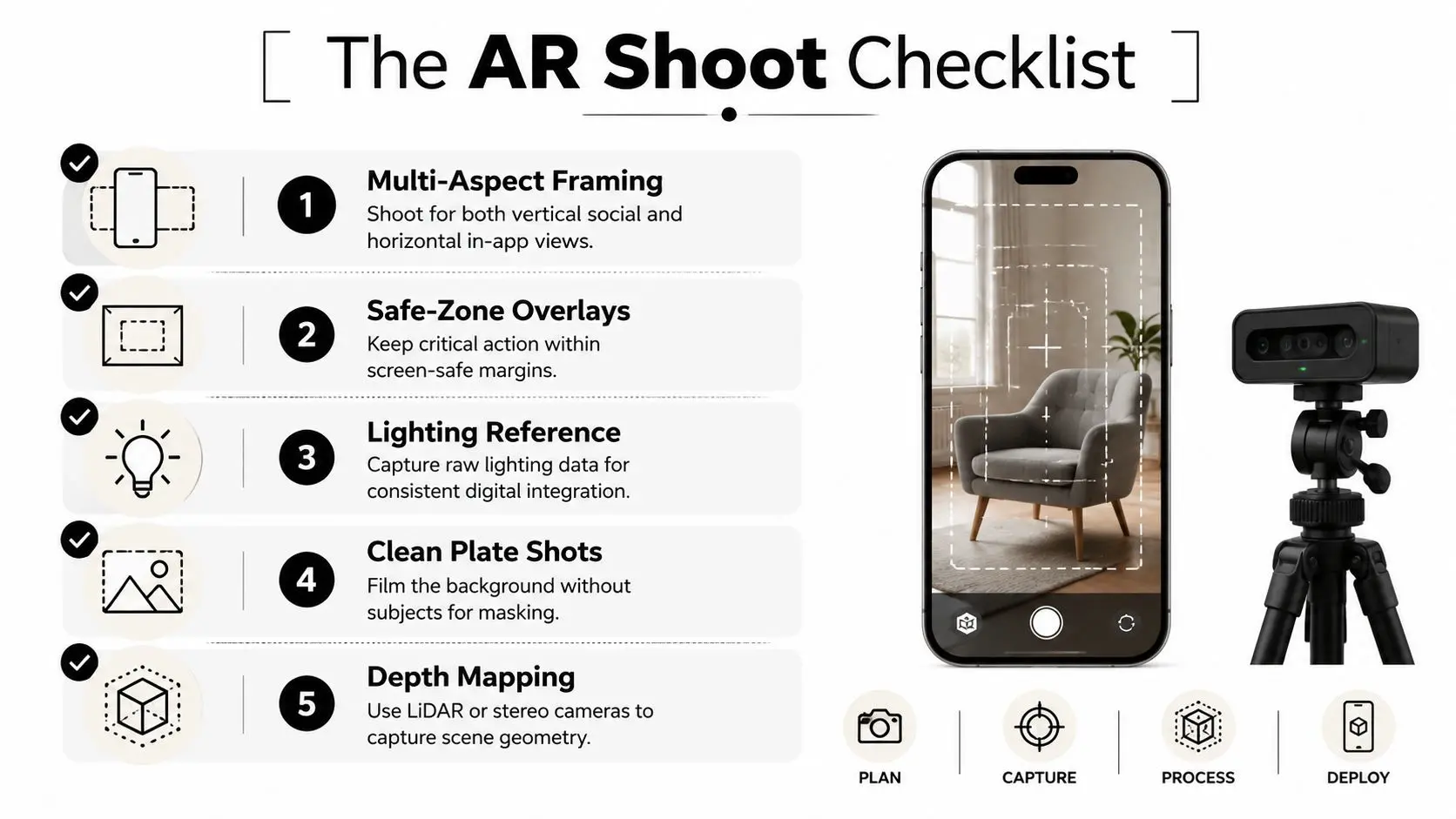 A strong shoot day also includes clean plate shots and lighting references. Clean plates let compositors mask objects and recover background detail. Lighting references help the digital layer sit naturally inside the live scene instead of floating over it.
 Shoot the plate as if the AR layer might change later, because it often will.UK mobile-first behaviour thus challenges teams. Brands rarely produce one-off edits anymore. They need the same asset to work across social, ecommerce, events, and immersive channels, so the capture has to survive that repurposing. Open-gate capture, dual-camera setups, and careful depth mapping all help, but only if the crew plans for them before the first take. The short version is blunt. If the plate is weak, the AR work gets blamed. If the plate is strong, the overlay has a chance to do its job.
Where AR Video Pays Off Across Verticals
The best use case depends on what the user needs to understand, not on how flashy the effect looks. Marketing wants attention and product recall. Education wants spatial comprehension or procedural understanding. Entertainment wants immersion, surprise, and repeatable audience interaction.Three verticals, three different jobs
| Vertical | Typical AR mechanic | Production complexity | Evidence signal | Honest caveat |
|---|---|---|---|---|
| Marketing | Product reveal, packaging scan, branded character or event overlay | Medium to high, depending on platform spread | Strong for attention and campaign differentiation | Attention doesn't guarantee action |
| Education | Guided overlay, annotated demonstration, spatial comparison | Medium, with careful script and QA | A University of Kansas study found students felt more engaged with an AR lesson, but learned less than those viewing video (KU study) | Engagement can outrun retention |
| Entertainment | Story-driven overlay, location-based scene, mixed-reality interaction | High, because timing and performance matter | AR can support memorable visitor experiences and repeat interaction | Novelty wears off if the interaction is shallow |
Distribution, Formats and the ROI Math
The launch date is not the finish line. For AR video, the true cost begins when the asset has to live across platforms that don't share the same format expectations. Industry guidance for AR commerce experiences often points to a mix of GLTF for Android ARCore, USDZ for iOS Quick Look, plus thumbnails and supporting 2D product media in the content system (format fragmentation example). That duplication is where many budgets expand.Delivery specs that keep projects sane
| Deliverable | What it does | Practical note |
|---|---|---|
| MP4 | Standard video delivery for playback and fallback | Keep it efficient for mobile viewing |
| GLTF | AR-friendly 3D format for Android-side experiences | Useful when the experience needs a model layer |
| USDZ | Apple's AR-friendly package for Quick Look | Keeps iOS preview workflows simpler |
| Encoding profile | Matches playback to platform constraints | Reduces stalling and compatibility issues |
| QA matrix | Tests devices, browsers, and network conditions | Prevents last-minute surprises |
Challenges, Best Practices and Studio Liddell Case Highlights
The failures are usually predictable. Lighting drift breaks the blend between plate and overlay. Occlusion fails when digital content should sit behind real objects but doesn't. Latency makes motion feel disconnected. Asset sync gets messy when the 2D and 3D files drift apart between versions. Rural bandwidth exposes all of it.What good production looks like
The fix starts with disciplined capture and QA. Lighting reference on set, depth-aware planning, and a clean handoff between editorial and runtime all reduce the chance of mismatch later. For tracking, marker-based projects suit controlled environments, while markerless or spatially mapped work makes more sense when the audience moves through an open space and the environment itself is part of the experience.A beautiful effect still fails if the plate and the runtime don't agree.On real jobs, Studio Liddell treats AR as part of a wider production pipeline rather than a standalone novelty. BooSnoo for Sky Kids is a useful kids-IP extension example because the content has to travel cleanly between screen formats. Dance! Dance! Dance! shows how mixed-reality event work depends on throughput and reliable interaction, not just visual flair. GeoEnergy NI demonstrates how technical communication benefits from visuals that make complex ideas easier to discuss with stakeholders.
 If you're planning an AR campaign, a production scoping call should cover the plate, tracking approach, runtime, delivery formats, and QA matrix before anyone commits to final art. For teams that already have a concept but need to know whether it will hold up in practice, a real-time pipeline audit is the faster way to uncover the weak points. --- Studio Liddell can scope your augmented reality video project from concept to delivery, including plate planning, Unity or Unreal tracking decisions, and the format mix needed for UK distribution. If you want a production team to pressure-test the idea before the budget hardens, visit Studio Liddell and ask for a production scoping call or a real-time pipeline audit.