AI Art Generator A Guide for UK Creative Businesses
You’re probably dealing with the same squeeze most creative teams face now. Clients want more concepts, more variants, faster approvals, and sharper visuals, but they don’t want the schedule or budget to expand with the brief. That’s why the ai art generator has moved out of the experimental corner and into real production conversations. Used well, it’s not a replacement for artists, designers, directors, or producers. It’s a way to shorten the slowest parts of creative development, especially early ideation, visual exploration, and asset prototyping, without lowering the bar on craft. The important point for UK businesses is that this isn’t speculative anymore. It’s a commercial workflow question. Teams need to know where AI helps, where it creates risk, and how to build it into a pipeline without losing control of quality, rights, or brand consistency.
The New Creative Imperative in 2026
Creative production has changed because the brief has changed. A single campaign now often needs launch visuals, social variants, motion assets, pitch frames, interactive prototypes, and sometimes spatial content for XR or events. The pressure isn’t just to make good work. It’s to make good work quickly, with room for revision.
Why AI moved from novelty to business tool
The turning point came when AI-generated work stopped being treated as a gimmick and started attracting serious market attention. In October 2018, 'Edmond de Belamy' sold at Christie’s in London for £346,000, establishing a major milestone for AI art in the UK market and signalling that AI-generated work had entered high-value creative territory (AI Artists timeline). That moment mattered because it changed the conversation. Buyers, institutions, and production companies started treating machine-generated imagery as something commercially relevant, not just technically interesting. For businesses, the lesson was simple:
- •AI can produce client-facing value: It’s no longer confined to internal experiments.
- •Traditional gatekeepers take it seriously: Auction houses, galleries, and media buyers now recognise AI work as part of the broader creative field.
- •Creative legitimacy changed the adoption curve: Once the market accepted AI output, production teams had to assess workflow impact rather than argue over whether the category was real.
What clients actually need from an ai art generator
Most clients don’t need a magic button. They need speed with oversight. In practice, that means using an ai art generator to:
- •Explore directions early: moodboards, style frames, environment looks, product atmospheres.
- •Reduce blank-page time: creative teams can react to something visual instead of debating abstract references.
- •Support approvals: rough concepts arrive sooner, which helps stakeholders respond earlier.
Practical rule: Use AI to widen options at the start, not to bypass judgement at the end.
The best results come when teams treat AI as a co-pilot in pre-production. It’s strong at variation, ideation, and first-pass visualisation. It’s weaker when the brief demands exact continuity, clean legal provenance, or final-pixel polish without human intervention. That’s the imperative in 2026. Creative businesses don’t need to decide whether AI belongs in the studio. They need to decide where it belongs, who controls it, and which parts of the pipeline still need experienced human hands.
Understanding the Core AI Technologies
Clients often hear a tool name and assume all image generation systems work the same way. They don’t. The underlying model changes what kind of output you get, how much control you have, and whether a tool is useful for production or only for experimentation.
GANs and diffusion models are not interchangeable
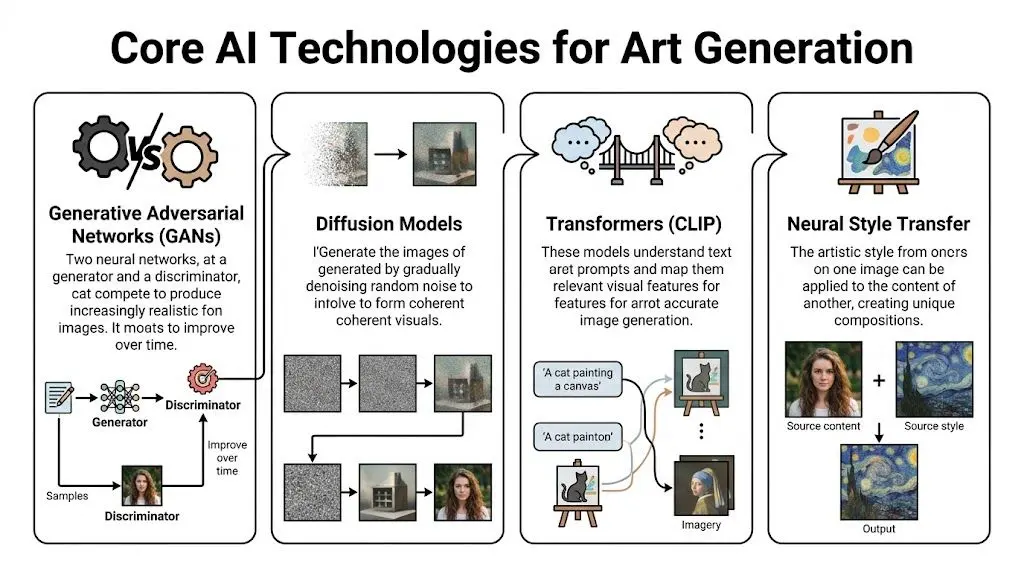
Generative Adversarial Networks, or GANs, work like a contest between two systems. One generates images. The other judges whether they look convincing. Over repeated rounds, the generator gets better at fooling the judge. That made GANs important in the earlier wave of AI art. They’re useful for style discovery and visual novelty. They also played a role in the creation process behind early landmark AI artworks. Diffusion models work differently. A useful way to think about them is as image reconstruction. The system starts with noise and gradually refines it over multiple steps until a coherent image appears. That process gives teams more control and usually better detail. In UK creative production, diffusion models now lead because they produce more stable and detailed outputs. The cited benchmark puts diffusion models at FID 12.5 versus GANs at 18.2, which is 30% lower, and links that performance to 40% faster asset prototyping for TV ads and immersive experiences (Eve Designs summary).
Where transformers fit
Transformers matter because they help the system understand language. When a prompt says “stylised woodland creature, soft rim lighting, storybook palette, front three-quarter view”, the model needs some way to map those words to visual traits. That’s where text-image alignment comes in. In practical terms, this is what makes prompting usable in production. It’s also why better prompting isn’t just writing more words. It’s writing clearer visual instructions. A simple breakdown looks like this:
| Technology | Best use in production | Main weakness |
|---|---|---|
| GANs | stylised exploration, visual experimentation | less stable control |
| Diffusion models | concept art, look development, texture ideation, prototype assets | can still drift on consistency |
| Transformers and CLIP-style text understanding | prompt interpretation, visual alignment with written briefs | only as good as the prompt quality |
| Neural style transfer | applying a visual treatment to existing imagery | narrower than full image generation |
Why hardware still affects creative decisions
One issue buyers often miss is that model quality and workstation setup are linked. The same prompt can feel practical or painful depending on available compute. If your team is planning in-house generation, a grounded primer on best GPUs for AI is worth reading before anyone commits to tool roll-out. It helps frame the inherent trade-off between speed, memory headroom, and budget. The operational question isn’t just “Which ai art generator should we pick?” It’s also “Can our production environment run it reliably enough to matter?”
A production-minded way to choose the model
Use the task to choose the technology.
- •Need expressive style routes quickly: GAN-style experimentation may still be useful.
- •Need stronger detail and more reliable prototyping: diffusion is usually the better fit.
- •Need prompt-driven iteration tied closely to a written brief: transformer-led text understanding becomes critical.
For commercial work, the safest default is usually a diffusion-based workflow with strong prompt discipline and human review. That’s also the logic behind many modern AI services, where the system generates options but artists and producers keep the decision-making.
If the output needs to survive client scrutiny, production scheduling, and downstream asset prep, model choice stops being technical trivia. It becomes a delivery issue.
Practical Use Cases in Creative Production
The easiest way to understand an ai art generator is to look at where it removes friction. Not in theory. In day-to-day production. Stable Diffusion is a good marker for how quickly these tools entered mainstream use. It reached over 10 million daily users globally by 2024, and a 2024 UK survey found 28% of UK digital artists using it for image generation (AIPRM statistics page). That level of adoption tells you this isn’t confined to R&D teams.
Early concept development
AI earns its keep fastest. A creative lead might begin with a broad prompt set for a new children’s character, then refine around silhouette, mood, costume cues, and palette. Instead of waiting for a single polished route, the team gets a wider visual field early. Some options will be unusable. That’s normal. The value is in finding the two or three promising directions sooner. For pitch work, that can mean:
- •More routes in the same review window
- •Clearer creative debate with clients
- •Less time spent searching stock references that almost fit
What doesn’t work is treating raw output as approved design. Character construction, repeatability, facial logic, and pose clarity still need an experienced artist.
Storyboards and explainer visuals
For explainers, internal comms films, and brand storytelling, AI can help teams rough out composition and pacing before the storyboard artist refines the sequence. That’s particularly useful when the brief is abstract. You may need to visualise a process, a technology platform, or an invisible system. The ai art generator can propose visual metaphors quickly. Some are obvious. Some are strange. A few clarify the entire treatment.
Raw AI boards are rarely presentation-ready. But they’re often good enough to decide whether a scene should be literal, graphic, cinematic, or symbolic.
That early clarity helps broader digital production too. Teams working across motion, interactive, and campaign content often need a joined-up visual language, which is why this broader guide to digital content creation services is useful context for buyers looking beyond a single deliverable.
Texture, surface, and world-building support
For 3D work, AI isn’t only about hero images. It can help create starting points for textures, decals, environmental surfaces, and style references for world-building. A practical example is immersive content. A team developing a VR environment might use image generation to test materials, signage looks, mural ideas, prop variations, or scene atmospheres before moving into full 3D production. That shortens the “what should this world feel like?” phase. It doesn’t remove downstream craft. Artists still need to:
- •clean outputs
- •rebuild assets to spec
- •ensure consistency across scenes
- •optimise for engine use
Tool choice affects the outcome
Different tools push teams toward different workflows. Some are stronger for stylised ideation. Others are better for technical control or local customisation. If you’re comparing mainstream options, this breakdown of Stable Diffusion vs Midjourney is helpful because it frames the trade-off between open-ended control and ease of use. That’s often the primary production choice. A client-friendly summary is simple:
- •Use AI to expand options
- •Use artists to shape those options into ownable work
- •Use production controls to make the result consistent and deliverable
Integrating AI into Studio Production Pipelines
A useful AI workflow doesn’t sit off to the side as a novelty app. It has to fit into the same production logic as boards, asset builds, engine prep, review cycles, and delivery specs.
Human-in-the-loop is the only reliable model
The strongest studio workflows don’t ask AI to finish the job. They ask it to accelerate the parts of the job that benefit from breadth and speed. That usually means AI handles the first pass and humans handle the decisions that matter:
- Prompt and generate rough directions for style, subject, mood, or composition.
- Curate the outputs against the brief. Most options get rejected.
- Rebuild or refine selected directions in standard production tools.
- Adapt for delivery inside animation, real-time, or campaign pipelines.
Where AI slots into Unity and Unreal workflows
In real-time production, AI works best upstream. Teams can use generated images to establish environment mood, material reference, UI look exploration, prop variations, or scene art direction. Once the direction is approved, artists translate that visual intent into engine-ready assets for Unity or Unreal Engine. That distinction matters. Engines need assets with technical discipline. They need efficient geometry, sensible texture handling, predictable lighting behaviour, and performance awareness. A generated image can inform all of that, but it can’t replace the pipeline that makes it shippable. A practical studio pipeline often looks like this:| Stage | AI role | Human role |
|---|---|---|
| Discovery | generate visual routes | define brief and constraints |
| Pre-production | produce concept variations | select, edit, align to brand |
| Asset creation | supply references and material ideas | model, texture, rig, animate |
| Engine integration | limited direct role | optimise and deploy in Unity or Unreal |
What works and what usually fails
AI integration works when the brief tolerates exploration and the team knows where to stop automating. It fails when someone assumes a strong-looking still image can move unchanged into production. That’s where schedules slip. The team ends up rebuilding under pressure because no one accounted for continuity, technical standards, or review discipline.Treat AI output as production input, not production completion.The most efficient pipelines are disciplined rather than over-automated. They preserve approvals, naming conventions, art direction control, and version tracking. AI can speed the front end of that system. It can’t replace the system itself.
Analysing ROI and Workflow Efficiencies
A client review is tomorrow morning. The team needs three credible visual routes, not one polished image and two apologies. That is where an ai art generator can earn its keep. It shortens the distance between brief and decision, which matters more than raw image volume. For studios, ROI shows up first in the parts of production where direction is still fluid and revisions are cheap. McKinsey’s reporting on generative AI points to meaningful productivity gains in creative and marketing workflows, especially in early-stage content development (McKinsey on the economic potential of generative AI). In practice, that usually means faster route testing, tighter client conversations, and fewer hours spent building presentation material that gets rejected on first review. The gain is not evenly distributed. Pre-production benefits most because AI helps teams compare options before the costly work starts. A producer can bring stronger references into kickoff, an art director can pressure-test style choices earlier, and a client can react to concrete visuals instead of abstract language. Those are schedule benefits, but they are also commercial benefits. Faster alignment reduces wasted paid time. Areas where studios usually see value:- •Concept development: more routes explored inside the same budget window
- •Treatment and pitch work: stronger visuals without committing full production resource
- •Internal review cycles: earlier feedback from strategy, production, and client teams
- •Look development: quicker comparison of tone, palette, composition, and setting
Costs need the same level of scrutiny. Subscription pricing is rarely the full number. If a studio runs models locally or supports heavier image generation workloads, infrastructure costs rise with GPU demand, storage, and admin overhead. Lenovo’s guide to AI infrastructure explains why compute, memory, and scaling requirements can become a meaningful operating cost once experimentation turns into regular production use (Lenovo on AI infrastructure requirements). For a small studio, that can be manageable. Across multiple artists and retained client work, it becomes a budgeting line item. There is also a quality threshold issue. AI output often performs well in still-image exploration and less well in jobs that depend on continuity across views, shots, or interactive environments. UK studios working in immersive production should treat that as an operational constraint, not a minor flaw. Nesta’s work on immersive and creative technology adoption in the UK points to uneven readiness and practical implementation challenges across the sector (Nesta on immersive technologies and the creative economy). In studio terms, that usually means more human correction, more version control pressure, and less certainty in delivery timing. A practical ROI review should look past generation speed and ask where labour moves.
| Scenario | Likely ROI |
|---|---|
| Moodboards and treatment visuals | strong |
| Style exploration before client sign-off | strong |
| Marketing concepts with limited continuity demands | strong to mixed |
| VR, interactive, or multi-angle asset consistency | mixed |
| Final deliverables with strict continuity and approvals | depends on human rework |
I advise clients to measure three things in a live project: hours saved in concepting, hours added in cleanup, and whether approval cycles got shorter. If the team creates options faster but still spends the same number of rounds correcting inconsistencies, the margin improvement is smaller than the demo suggests. Governance affects ROI too. A studio that cannot track prompts, approvals, asset origin, and client restrictions will lose time in review and legal checks. That is one reason internal process matters as much as tool choice. Clear handling of generated assets, data, and client information should sit alongside your wider studio privacy and data handling policy. The best commercial result comes from narrow, deliberate adoption. Use AI where variation helps the brief and where rework will stay contained. Keep experienced artists and producers in control of selection, correction, and delivery standards. That is how studios get time savings without creating a second production pass that wipes out the gain.
Navigating UK Legal and Ethical Issues
A producer approves AI-assisted concept frames on Friday. On Monday, the client asks a simple question. Who owns this work, what was it trained on, and can you indemnify us if a claim appears later? If the studio cannot answer in plain English, the time saved in generation disappears into legal review, procurement delays, and avoidable rework.

For UK production, the main risk is not abstract ethics. It is whether a studio can show how an image was made, what rights sit behind it, and what safeguards were applied before anything reaches client approval. That matters more in 2026 because procurement teams, broadcasters, brands, and insurers are asking tighter questions about provenance, privacy, and liability. Studios should treat AI output as a controlled production input, not a rights-free asset. Copyright status can be unclear. Training data may be opaque. Contract terms often differ by tool, and some platforms place more responsibility on the user than teams expect. In practice, that means legal review needs to happen before delivery pressure kicks in.
What buyers should ask before approving AI use
Direct questions save time later.
- •Which tool produced the asset, and what do its terms say about commercial use?
- •Was any client data, confidential brief material, or personal information entered into the system?
- •Which elements are generated, and which were created, edited, or rebuilt by artists?
- •What records exist for prompts, review history, approvals, and final asset selection?
- •What indemnities, exclusions, or liability caps apply in the contract?
Those questions are practical because they expose where risk sits. If a supplier cannot answer them clearly, the issue is not only legal. It is operational. A working checklist usually looks like this:
| Risk area | Practical action |
|---|---|
| Copyright provenance | record the tool used, version, prompts, and source inputs |
| Ownership and usage rights | define deliverables and permitted use in contract language |
| Style imitation risk | avoid prompts that target living artists, known franchises, or close brand mimicry |
| Client confidentiality | restrict what can be entered into third-party systems and review the studio's privacy and data handling approach |
| Approval control | require human review before anything is shared as near-final or final |
Ethical practice shows up in production decisions
Ethics becomes concrete fast. A team under deadline pressure may be tempted to push generated work further downstream than it should go. That is where problems start. If continuity is weak, if a result imitates a recognisable style too closely, or if a private brief was pasted into a public model, the studio has created commercial exposure, not efficiency. The better approach is simple. Use AI for stages where variation helps, keep experienced artists and producers in the approval chain, and document enough of the process that a client, legal team, or insurer can follow what happened. The studios getting this right are not the ones making the boldest claims. They are the ones with clear rules, clean audit trails, and contracts that match the actual workflow.
Your Roadmap to Strategic AI Adoption
Most businesses don’t need a sweeping AI transformation plan. They need a controlled way to test where an ai art generator effectively improves delivery.
Start with a contained pilot
Pick one low-risk use case. Concept art for a pitch. Moodboards for a campaign. Early visual routes for a non-sensitive internal project. Keep the scope tight. You’re not trying to prove that AI can do everything. You’re trying to learn where it helps without disrupting the rest of the pipeline.
Invest in process before scale
The next step isn’t buying more tools. It’s agreeing how the team will use them. Define who writes prompts, who approves outputs, what gets rebuilt by artists, and what can never go straight to client approval without review. In these circumstances, most adoption efforts either become useful or become messy. A practical internal policy should cover:
- •approved tools
- •review stages
- •rights and disclosure rules
- •file handling and archiving
- •client sign-off expectations
Integrate only after the workflow earns it
Once the pilot shows clear value, then you can integrate AI into broader production. That may mean making it part of concept development, previsualisation, texture ideation, or pitch support. The key is restraint. Expand from proven wins, not from hype. Businesses that get this right usually treat AI as an enhancement to established creative practice. The machine broadens the option set. The team still provides taste, structure, accountability, and delivery discipline.
Frequently Asked Questions
Will AI devalue human artists
Not in any serious production environment. It changes where artists spend their time. The repetitive early exploration can become faster, but the hard parts still need people. Taste, narrative judgement, client interpretation, brand sensitivity, continuity, and technical execution don’t disappear because a tool can generate images.
Can an ai art generator produce a unique brand style
It can help discover one. It shouldn't be trusted to define one on its own. The strongest branded work comes from using AI to test visual directions, then having designers and art directors refine those ideas into something consistent, ownable, and repeatable across formats.
Is it better for static work than animation or XR
Usually, yes. Static concepting is where AI tends to be most straightforward. Animation and XR raise the bar because the work has to hold up across movement, continuity, interactivity, and technical constraints. That doesn’t make AI useless there. It means the human cleanup and rebuild stage matters more.
Do we need expensive infrastructure to start
Not always. Many teams can begin with hosted tools and small pilot workflows. The need for heavier hardware shows up when you want more control, more volume, or local deployment. That's why the technical and financial side should be assessed before broad rollout, not after the team has already built dependency on a tool.
What's the biggest mistake companies make
They confuse image generation with production readiness. A striking output can create false confidence. The right question isn't “Does this look good?” It's “Can this move through approvals, rights checks, downstream build, and final delivery without creating more work than it saves?”
If you're exploring how AI-enhanced workflows can support animation, XR, and digital production without creating legal or pipeline headaches, Studio Liddell can help you assess where the technology fits, where it doesn’t, and how to adopt it responsibly.