Advertising on App: A UK Guide to Success
You already have the audience. People are opening the app, spending time in it, and returning. The hesitation usually starts when the next question lands on the table. How do you advertise on app without making the experience feel cheap, intrusive, or off-brand? That concern is valid. Poorly handled mobile ads train users to dismiss, mute, or resent the brand behind them. Good in-app advertising does the opposite. It supports discovery, drives installs or sales, and can make the app itself more commercially useful without damaging retention. The commercial case is hard to ignore. The UK in-app ad market reached £26.1 billion in 2024 and is projected to grow to £29.1 billion in 2026, while video accounts for 52% of spend at £15.1 billion and non-gaming apps are growing ad investment by 20% year on year, according to UK mobile marketing projections. That tells you two things. First, advertising on app is no longer a side channel. Second, the market is rewarding formats that depend on strong moving image craft. That’s where many campaigns either outperform or disappear. Media buying matters. Measurement matters. But if the creative is forgettable, badly timed, or mismatched to the app environment, the targeting won’t save it. In practice, the strongest in-app campaigns treat animation, motion design, interactive prototyping, and real-time content as performance levers, not just visual polish. If your team is still shaping production workflows for mobile creative, it can help to look at tools built around rapid iteration, such as an AI video creation app, then assess where automated speed is enough and where bespoke animation or XR execution will do more for response quality.
Introduction The Untapped Potential on Every Smartphone
The untapped part of app advertising isn't the inventory. It’s the gap between what the format can do and what most brands produce for it. A lot of businesses still run mobile placements as resized versions of web ads, TV cut-downs, or generic social edits. Those assets may fill the slot, but they rarely fit the moment. On a phone, the user is close to the screen, quick to judge, and even quicker to skip.
What the market is signalling
The UK figures point to a mature market where app environments command serious budget. Brands aren’t moving money into mobile because it’s fashionable. They’re doing it because users are there, because video carries the message better, and because app experiences can hold attention in ways browser environments often can’t. That should change how creative decisions get made. If video is taking such a large share of spend, then art direction, pacing, sound design, interaction design, and rendering quality stop being cosmetic decisions. They become commercial ones.
Practical rule: If the ad could run unchanged on any platform, it probably isn’t tailored tightly enough for an app placement.
Why creative quality matters more on app
In-app environments magnify both strengths and mistakes. A well-made rewarded video can feel like fair value exchange. A polished playable can pre-qualify intent before the install. A native unit with the right visual language can sit naturally inside the product. A clumsy full-screen placement does the opposite. It interrupts the flow, signals low relevance, and tells the user the brand hasn’t paid attention to where it’s appearing. That’s why the most effective approach to advertising on app combines media logic with production discipline. Script for the exact placement. Build for sound-off and sound-on. Design transitions that respect the app’s rhythm. Use 2D, 3D, or real-time interactive assets where they improve comprehension or lift perceived value. The technical stack serves the experience. The experience drives the result.
Understanding the In-App Advertising Ecosystem
Most clients first see app advertising as a black box. Budget goes in, impressions come out, and several acronyms appear in the reporting. The cleaner way to understand it is to think of it as a fast-moving property market. The app publisher owns the space. The advertiser wants the right placement. The machinery in the middle decides who gets shown, where, and at what price.
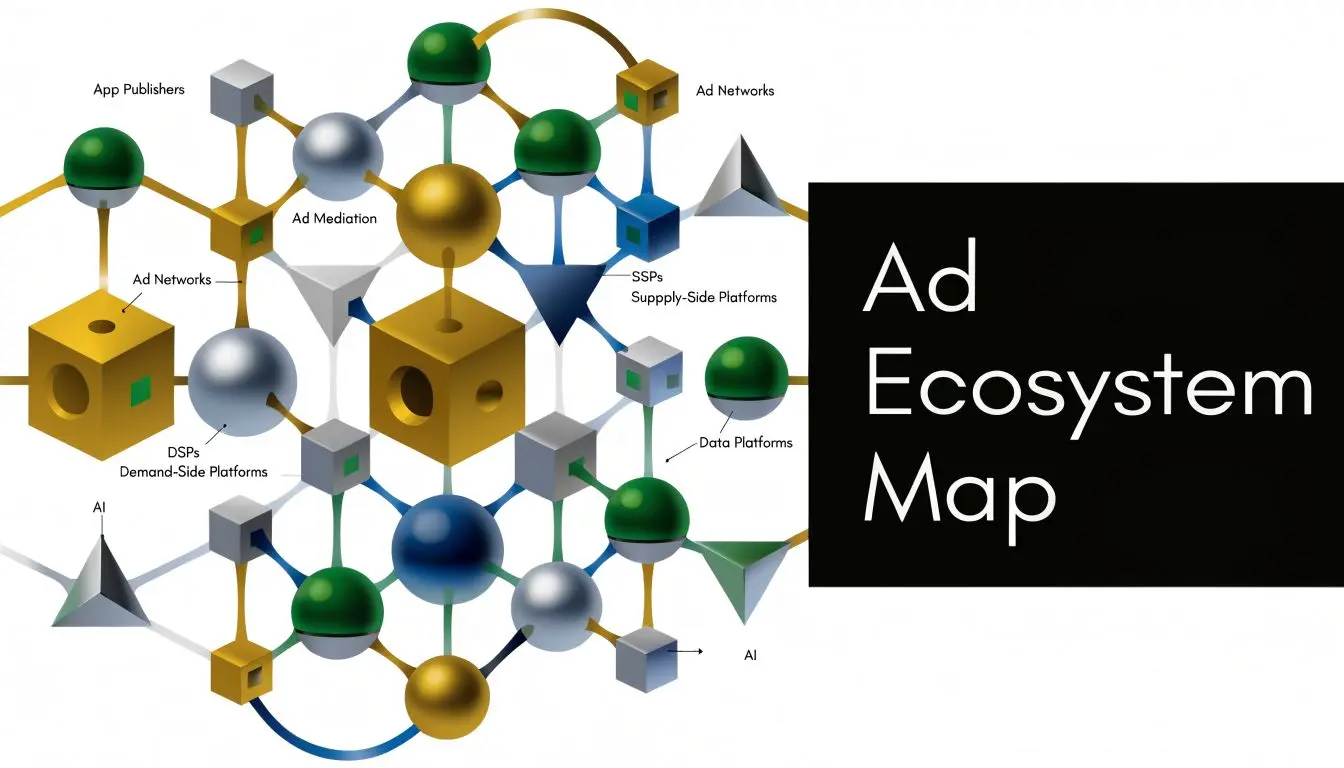
Who does what
Here’s the practical version of the ecosystem:
- •Publishers: They own the app and the ad inventory inside it. That could be a game, a streaming app, a utility product, or a learning platform.
- •Advertisers: They pay to reach the publisher’s audience. Usually they want installs, purchases, subscriptions, or some other measurable action.
- •Ad networks: They bundle inventory and demand together. For some buyers, they simplify access. For some publishers, they simplify fill.
- •SSPs: A supply-side platform helps the publisher manage, price, and sell inventory across multiple buyers.
- •DSPs: A demand-side platform helps the advertiser buy impressions programmatically against selected audiences, contexts, and bid logic.
How an ad reaches the screen
A user opens an app. The app requests an ad slot. The publisher’s setup makes that slot available. Buyers compete for it. The winning creative gets served in a fraction of a second. That auction logic sounds purely technical, but it has direct creative implications. If your ad takes too long to communicate, opens weakly, or lands in the wrong context, the placement cost may still be paid even though the user gained almost nothing from the encounter.
The media stack decides who gets the impression. The creative decides whether that impression had any value.
Why this matters in real buying conversations
When a client says they want “more scale”, the useful question isn’t just which network or DSP to use. It’s whether the app category, format, and creative are aligned. A sports app audience behaves differently from a meditation app audience. An ad that feels natural in a children’s entertainment environment may feel jarring in a finance tool. That’s also why direct publisher deals, curated marketplaces, and carefully managed programmatic buying can outperform broad, low-context buying. Relevance starts before the user ever sees the asset. If you’re working in gaming environments specifically, Studio Liddell’s guide to in-game ad formats and strategy is a useful companion because it frames formats around player experience rather than just inventory labels.
Choosing Your In-App Ad Formats
Format choice shapes everything that follows. It affects your creative brief, your production cost, your KPI model, and the amount of tolerance the user gives you. Picking the wrong format is one of the fastest ways to overspend on media or annoy the audience.
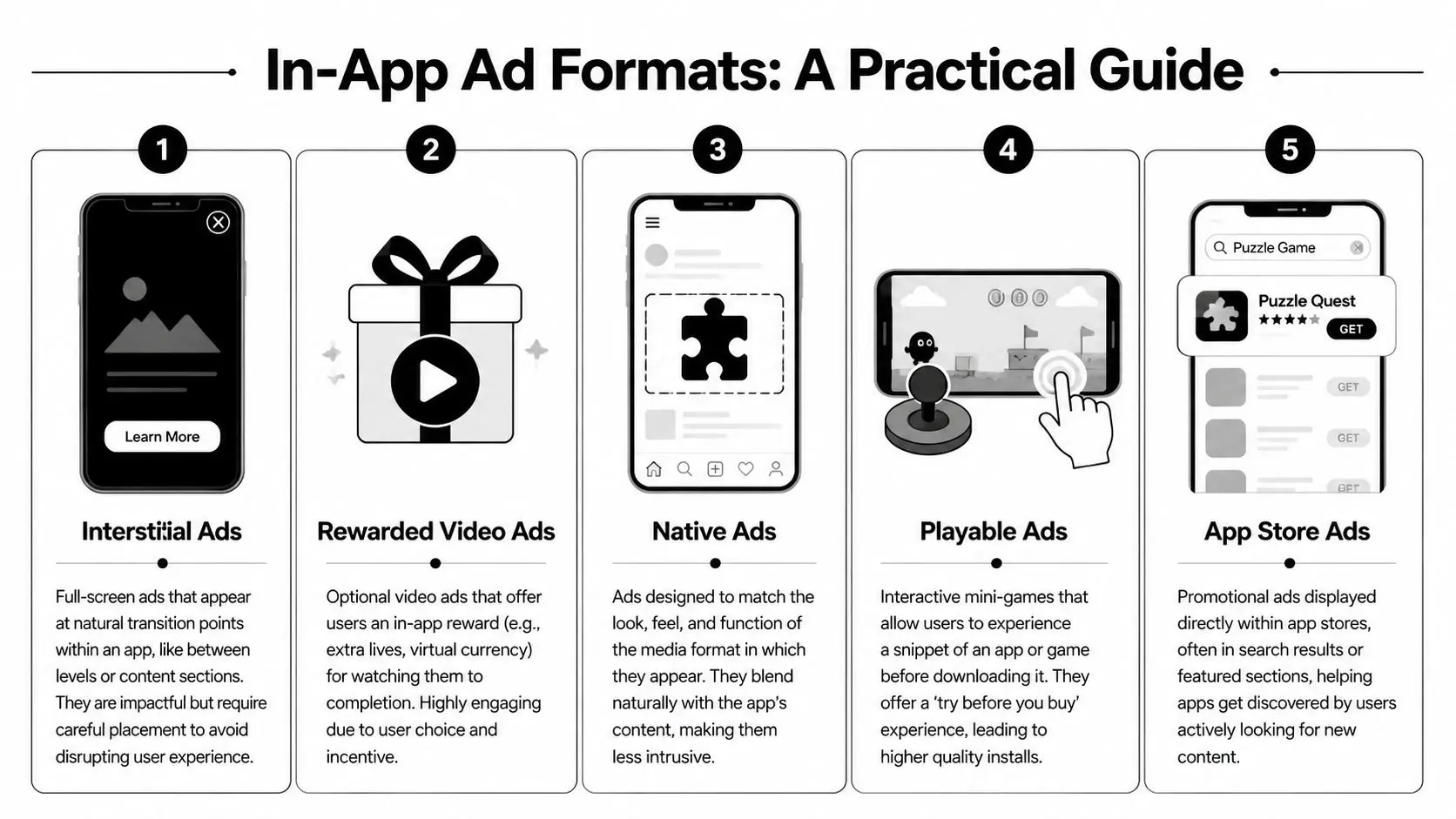
The five formats that matter most
Interstitial ads These take over the screen, usually at a transition point such as between levels, articles, or sessions. They’re simple to deploy and can be visually strong. They also punish poor timing. If they interrupt a task instead of sitting at a natural pause, users notice the friction immediately. Rewarded video ads The user chooses to watch the ad in exchange for something useful inside the app. In games that might be extra lives or currency. In other products it can be access, feature activations, or functional value. This is one of the clearest examples of advertising working because the proposition is transparent. Native ads These are designed to match the surrounding interface. Good native work feels integrated rather than disguised. The line is important. Native shouldn’t mean deceptive. It should mean visually consistent, clearly labelled, and less disruptive. Playable ads These let the user interact with a small slice of the app or game before installing. They’re especially useful when the product’s appeal depends on mechanics, feel, or direct manipulation. A static trailer can describe that experience. A playable can prove it. App store ads These appear inside app marketplace environments where the user already has discovery intent. They’re useful when you want to capture active demand rather than interrupt passive browsing elsewhere.
In-App Ad Format Comparison
| Ad Format | Best For | Pros | Cons |
|---|---|---|---|
| Interstitial | Broad reach and strong visual impact | Full-screen presence, straightforward production, clear CTA | Easy to overuse, can feel disruptive |
| Rewarded Video | Value exchange and deeper attention | User opts in, better goodwill, strong completion potential | Needs a meaningful reward structure |
| Native | Lower-friction brand visibility | Fits the app environment, supports content-led messaging | Weak creative can disappear into the interface |
| Playable | High-intent installs and product demos | Users can test the experience, useful for pre-qualification | Higher production complexity |
| App Store Ads | Capturing active search or browse intent | Reaches users close to install decision | Less room for broad storytelling |
What tends to work and what doesn’t
A few patterns come up repeatedly in production:
- •Use interstitials at true breaks: They work better when the app has a natural pause. They work worse when they cut across a task the user is trying to complete.
- •Treat rewarded as product design: The reward has to be worth the watch. If the exchange feels stingy, users learn not to bother.
- •Design native from the UI outward: Match spacing, typography logic, and pacing. Don’t just drop a banner into a feed and call it native.
- •Reserve playables for experiences that benefit from touch: If the core appeal is interactive, a playable earns its keep. If not, the extra production may not justify itself.
- •Write app store ads for intent: The user is already looking. Clarity usually beats brand theatre in that context.
The most common mistake is trying to solve every objective with one format. Install campaigns, re-engagement campaigns, monetisation inside your own app, and premium brand storytelling usually need different structures.
Creative and UX Best Practices for Higher Engagement
A user opens a banking app to transfer money, a game to claim a reward, or a retail app to check stock. In each case, the ad is entering a live task, not an empty moment. Creative that ignores that context gets skipped, closed, or remembered for the wrong reason. Research cited by Verve on ad relevance in mobile apps found that 49% of users are discouraged by mismatched ads, 43% say those mismatches lower their perception of the brand, and mobile apps deliver 50% higher ad receptivity than YouTube when the ad is relevant and high-quality. That is the commercial case for treating creative quality as a performance variable, not a finishing touch.
Match the ad to the user’s state
The strongest app ads respect what the user is doing and how much attention they are willing to give. A finance app session usually calls for restraint and immediate clarity. A gaming or entertainment session can support more motion, more character, and a stronger sense of play. That changes four practical production decisions:
- •Visual language: Colour, contrast, pacing, and typography need to fit the emotional temperature of the placement.
- •Opening message: Lead with the value the user can grasp in seconds, not the line the brand likes most internally.
- •Information load: Small-screen creative has to prioritise. One clear promise usually outperforms three half-explained ones.
- •Interaction cues: If touch, swipe, rotate, or tap matters to the product, show that behaviour early.
Creative fit is often what separates tolerated ads from effective ones.
High-fidelity creative reduces drop-off
Teams often treat media buying as the hard part and creative as the variable to test around the edges. In app advertising, that is expensive thinking. The ad unit itself has to do more work. It has to explain fast, feel native to the moment, and justify the interruption. Animation and XR earn their budget; high-fidelity 3D product visualisation can show shape, feature logic, and use case faster than static frames. Character animation can add recall without cluttering the screen. Real-time units built in Unity or Unreal can pre-qualify users by letting them interact before they click. The trade-off is straightforward. Better production does not mean more visual noise. It means better control over timing, framing, and clarity. If the extra craft does not help the user understand the offer faster, it is decoration. A simple test helps. Hide the logo and CTA for a moment. If the piece still reads clearly, fits the app environment, and makes the next action obvious, the creative is doing its job.
Design for acceptance
On mobile, attention is fragile. User acceptance usually comes from disciplined execution more than spectacle.
- •Front-load meaning: If the format can be skipped, the first seconds need product truth, not cinematic build-up.
- •Use motion to guide the eye: Camera moves, transitions, and effects should explain hierarchy and interaction.
- •Make audio additive, not required: The ad must work on mute first.
- •Earn the CTA: Show value before asking for the tap, install, or purchase.
- •Respect UI constraints: Safe areas, thumb zones, text scale, and orientation are part of performance, not just delivery specs.
This is also why weak creative gets punished more heavily in apps than on broader video channels. The phone is personal, the screen is small, and the interruption is felt immediately. If your team needs a stronger planning model before production starts, these creative frameworks for video ads are a useful reference for scripting, sequencing, and mobile-first message design. For more demanding briefs, specialist production support can be the difference between an ad that looks expensive and one that performs. That matters most with interactive builds, high-end motion systems, and XR-led concepts where user experience and creative execution have to work as one.
Budgeting and Monetisation Models
Budgets go wrong in app advertising when teams buy against the wrong pricing model or judge performance too early. Before any creative goes live, define the business outcome. Are you buying awareness, clicks, installs, purchases, or retention? That decision determines how the budget should be structured.
The core payment models
CPM is cost per thousand impressions. It’s usually the cleanest option when reach and visibility matter most. CPC is cost per click. It’s useful when you want to measure immediate traffic behaviour, though click quality can vary. CPI is cost per install. For app growth campaigns, this is often the operating metric teams focus on first because it ties spend to a clear acquisition event. CPA is cost per acquisition or action. This is stricter. You only care about the downstream event that matters to the business, whether that’s a registration, purchase, or subscription.
Why CPI needs careful handling
UK app acquisition has become more expensive and less forgiving when the creative is weak. According to AppsFlyer’s in-app advertising analysis, average UK CPI for gaming apps reached £1.85 in Q4 2025, up 28% year on year after iOS 14.5, while high-quality playable ads built in Unity or Unreal can achieve sub-£1.50 CPI by improving install quality by over 22%. That’s a useful benchmark because it shows two realities at once. Privacy changes have pushed costs up. Creative that pre-qualifies users can still pull efficiency back.
A practical way to set the budget
Start with the action that creates value for your business, then work backwards.
- Define the target event: Install, sale, account creation, or subscription.
- Choose the buying model that suits that event: Don’t buy on impressions if the business only cares about installs.
- Reserve budget for creative variants: App campaigns need iteration. One asset is rarely enough.
- Separate test budget from scale budget: The first round should answer questions, not chase volume.
- Plan monetisation in parallel: If you run your own app inventory, ad revenue, IAP, subscriptions, and hybrid models need to work together.
Budgeting gets easier when you stop asking “what can we afford to spend?” and start asking “what event are we willing to pay for?”
Measuring Success with the Right KPIs
A campaign can generate plenty of impressions and still be commercially weak. That’s why app reporting needs to move past surface metrics quickly. Reach tells you the ad was served. It doesn’t tell you whether the campaign created useful users or useful revenue.
Which KPIs matter most
ROAS is usually the first serious business metric to watch. It tells you how much revenue the campaign generated relative to spend. LTV matters because not every install is equal. Some users churn immediately. Others spend, subscribe, and stay. Retention tells you whether the promise in the ad matched the actual product. If retention is weak, the campaign may be buying the wrong audience or setting the wrong expectation. Creative response signals such as completion behaviour, interaction depth, and post-click quality help you diagnose why one asset beats another. They aren’t the final measure, but they often explain it.What the UK benchmarks suggest
According to UK mobile app marketing KPI benchmarks, rewarded ads can produce a 2.5x ROAS uplift compared with standard interstitials, driven by an opt-in mechanic that boosts engagement by 40%. The same source notes that average ROAS for e-commerce apps is 1.8x, meaning £1 spent generates £1.80 in revenue. Those numbers matter because they show why format and user consent can’t be treated as cosmetic choices. If the structure of the ad changes attention and engagement, it changes economics.How to read performance properly
A strong reporting setup asks connected questions:- •If CPI looks efficient but retention is poor, the ad may be attracting curiosity rather than fit.
- •If ROAS is weak but engagement is high, the CTA, landing flow, or offer may be the issue.
- •If rewarded outperforms interstitial, the value exchange may be better aligned with user intent.
- •If one creative wins across several audiences, inspect the opening, message order, and visual clarity before assuming the audience targeting did all the work.
Teams that need a firmer measurement foundation should look at this guide to mobile app tracking, particularly when trying to connect creative choices with post-install behaviour.
Good reporting doesn’t just tell you what happened. It tells you what to make next.
Conclusion Your Next Steps in App Advertising
A user opens an app to complete a task, pass time, or get rewarded. The ad only works if it respects that moment and earns attention quickly. That is why app advertising succeeds or fails at the creative level as much as the media level. Strong app campaigns are built as systems. Format, placement, measurement, and creative all need to support the same commercial goal. Teams often configure the media correctly, then treat the asset as a deliverable to finish late. That decision shows up fast in performance. Weak motion, unclear value, or interactions that feel awkward inside the app environment reduce attention, lower completion, and make acquisition more expensive. The practical next step is simple. Scope creative and measurement together. That means defining what the ad needs to do before production starts, choosing the right execution for the format, and setting success criteria that reflect both response and downstream value. For some campaigns, that will be high-clarity animated video. For others, it will be playable creative or XR-led interaction that gives users a better sense of the product before they install or buy. The right choice depends on audience, context, and the level of commitment you need from the user. If you need a production partner for app advertising creative, Studio Liddell can help map the brief to the right format, then produce the animation, interactive content, or XR assets required for launch. A useful first move is a scoping conversation focused on audience, ad format, creative requirements, and how success will be measured.